



 Mercedes-Benz GL-Class: Control panel for dual-zone automatic climate control
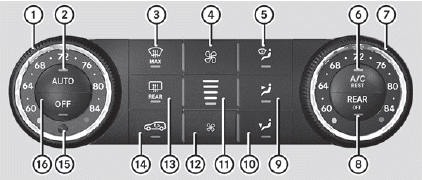
1 To set the temperature, left
2 To set climate control to automatic
3 To defrost the windshield
4 To increase the airflow
5 To direct the airflow through the defroster vents
6 To activate/deactivate cooling with air dehumidification
7 To set the temperature, right
8 To switch rear-compartment climate control on/off
9 To direct the airflow through the center and side air vents
10 To direct the airflow to the footwells and side air vents
11 To display the airflow level
12 To reduce the airflow
13 To switch the rear window defroster on/off
14 To activate/deactivate air-recirculation mode
15 Interior temperature sensor
16 To switch climate control on/off
 Important safety notes
WARNING
Severe conditions (e.g. strong air pollution) may require replacement of the
filter before
its scheduled replacement interval. A clogged
filter will reduce the air volume to t ...
 Notes on using dual-zone automaticclimate control
The following contains notes and
recommendations on optimum use of dualzone
automatic climate control.
• Activate climate control using the
and
buttons. The indicator lamps in the
and
b ...
See also:
Root Directory
The root directory of the disc is treated as a folder. If the root directory
has compressed audio files, the directory displays as F1 ROOT on the radio.
If a disc contains both uncompressed CD audi ...
Traction Control System (TCS)/StabiliTrak® Light
The TCS/StabiliTrak light comes on briefly when the engine is started.
If the light does not come on or stays on, have the vehicle serviced by the dealer.
If the system is working normally, the in ...
If your vehicle is stolen
If your vehicle is stolen, you should change
the codes of any non-rolling code device
that has been programmed into
HomeLink®. Consult the Owner’s Manual
of each device or call the manufact ...


