



 Infiniti QX: Clock
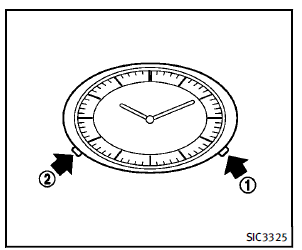
If the power supply is disconnected, the clock will not indicate the correct time. Readjust the time.
ADJUSTING THE TIME
1. To set the clock forward, push the
button 1 .
2. To set the clock backward, push the
button 2 .
3. To move forward or backward faster,
push and hold the button more than 5
seconds.
For details about display clock adjustment
(if so equipped), see “How to use SETTING
button” in the “4. Monitor, climate, audio,
phone and voice recognition systems”
section.
 Vehicle Dynamic Control (VDC) OFF switch
The vehicle should be driven with the
Vehicle Dynamic Control (VDC) system on
for most driving conditions.
If the vehicle is stuck in mud or snow, the
VDC system reduces the engine output to ...
 Power outlet
CAUTION
► Use power outlet with the engine running
to avoid discharging the vehicle
battery.
► Avoid using power outlet when the air
conditioner, headlights or rear window
de ...
See also:
Engine Drive Belt Routing
Engine Drive Belt
Routing
...
Care of Your CDs and DVDs
Sound quality can be reduced due to disc quality, recording method, quality of
the music recorded, and how the disc has been handled. Handle discs carefully and
store them in their original cases or ...
INFINITI Advanced Air Bag System (front seats)
WARNING
To ensure proper operation of the passenger’s
advanced air bag system, please
observe the following items.
► Do not allow a passenger in the rear seat
to push or pull on the ...


