



 Cadillac Escalade: Battery Replacement
Replace the battery if the REPLACE BATTERY IN REMOTE KEY message displays in the DIC. See “REPLACE BATTERY IN REMOTE KEY” under Key and Lock Messages for additional information.
Notice: When replacing the battery, do not touch any of the circuitry on the transmitter. Static from your body could damage the transmitter.
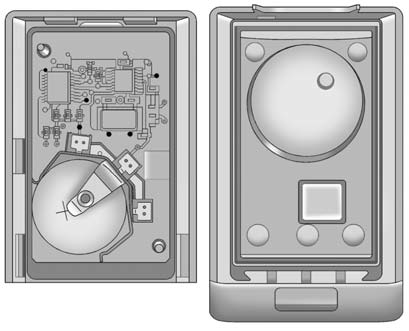
To replace the battery:
1. Separate the transmitter with a flat, thin object inserted into the notch,
located above the metal base.
2. Remove the old battery. Do not use a metal object.
3. Insert the new battery, positive side facing up. Replace with a CR2032 or equivalent
battery.
4. Snap the transmitter back together.
 Programming Transmitters to the Vehicle
Only RKE transmitters programmed to this vehicle will work. If a transmitter
is lost or stolen, a replacement can be purchased and programmed through your dealer.
When the replacement transmitter is ...
 Remote Vehicle Start
This feature allows you to start the engine from outside of the vehicle. It may
also start up the vehicle's heating or air conditioning systems and rear window
defogger. Normal operation of the ...
See also:
Tires
Use a stiff brush with tire cleaner to clean the tires.
Notice: Using petroleum-based tire dressing products on the vehicle may damage
the paint finish and/or tires. When applying a tire dressing, a ...
Winter tires
At temperatures below 45 °F(+7 °C), use
winter tires or all-season tires. Both types of
tire are identified by the M+S marking.
Only winter tires bearing the
snowflake
symbol in addition to ...
Exterior front
1. Hood (P.3-18)
2. Windshield wiper and washer
— Switch operation (P.2-33)
— Rain-sensing auto wiper system
(P.2-34)
— Wiper blade replacement (P.8-20)
— Window washer fluid (P. ...


