



 Mercedes-Benz GL-Class: Attaching the cargo net
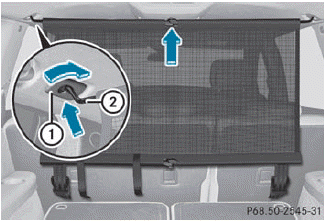
Cargo net attached behind the C-pillar
► Insert guide rod 2 into retainer 1 in
the
direction of the arrow.
► Slide guide rod 2 forwards into
retainer 1 in the direction of the arrow.
 Preparing the cargo net
The cargo net can be used in two different
positions (behind the B-pillar or the C-pillar).
• The brackets behind B-pillar : are
required for the cargo compartment
enlargement.
The correspo ...
 Tightening the cargo net
Seat belt reel holder behind the front seats
► Insert belt hook 1 into cargo tie-down
ring 2 in the direction of the arrow.
► Pull tensioning strap 3 by the loose end
in
the direct ...
See also:
Engine Oil Pressure Light
Notice: Lack of proper engine oil maintenance can damage the engine. Driving
with the engine oil low can also damage the engine. The repairs would not be covered
by the vehicle warranty. Check the ...
Filling a Portable Fuel Container
WARNING
Never fill a portable fuel container while it is in the vehicle. Static electricity
discharge from the container can ignite the fuel vapor. You can be badly burned
and the vehicle damaged ...
Checking engine coolant level
Check the coolant level in the reservoir
when the engine is cold. If the coolant
level is below MIN 2 , open the reservoir
tank cap and add coolant up to the MAX1
level. If the reservoir tan ...


