



 Mercedes-Benz GL-Class: Activating/deactivating DSR
Activating
DSR can only be activated if you are driving no faster than 20 mph (30 km/h).
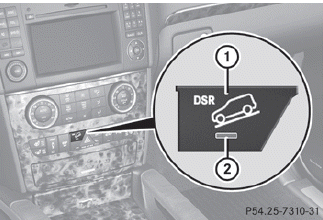
Vehicle without the Off-Road Pro Engineering package
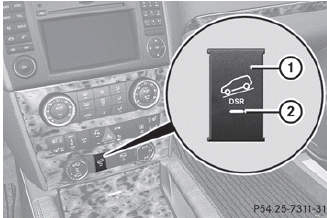
Vehicle with the Off-Road Pro Engineering package
► Press button 1.
Indicator lamp 2 lights up.
The DSR symbol and a message, such as the following, appear in the multifunction display:
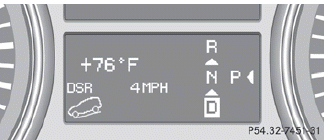
If the speed that is being driven is too high, the DSR symbol and the Max. speed 20 mph (Canada: 30 km/h) message appears in the multifunction display.
Deactivating
► Press button 1.
Indicator lamp 2 goes out.
The DSR symbol appears in the multifunction display with the Off message.
DSR is deactivated automatically if you are driving faster than 21 mph (Canada:
35 km/h). The DSR symbol appears in the multifunction display with the Off message.
You also hear a warning tone.
 Important safety notes
DSR is an aid to assist you when driving
downhill. It keeps the speed of travel at the
speed selected on the on-board computer.
The steeper the downhill gradient, the greater
the DSR braking eff ...
 Changing the set speed whilethe vehicle is in motion
When DSR is activated, the control speed can
be changed to a value between 3 mph and
10 mph (Canada: between 4 km/h and
18 km/h) during the journey.
► To increase or decrease in 1 mph
(Ca ...
See also:
INFINITI Voice Recognition system
INFINITI Voice Recognition allows handsfree
operation of the Phone, Navigation,
Information and Audio systems in one of
two modes, Standard Mode or Alternate
Command Mode.
In Standard Mode, ...
Using ACC
1. SET+: Press to increase or set the speed.
2. Press to resume the set speed.
3. Press to decrease the set speed.
4. CAN: Cancels, but retains the set speed in memory.
5. Press to decrease the ...
Storing and maintaining the currentspeed
You can store the current speed if you are
driving faster than 20 mph (30 km/h).
► Accelerate the vehicle to the desired
speed.
► Briefly press the cruise control lever
up 1 or down ...


