



 Cadillac Escalade: Universal Remote System Programming
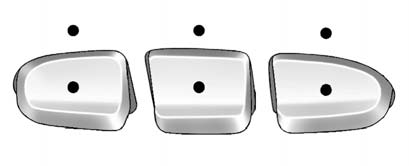
Vehicles with the Universal Remote System will have these buttons located in the headliner.
This system provides a way to replace up to three remote control transmitters used to activate devices such as garage door openers, security systems, and home automation devices.
Do not use this system with any garage door opener that does not have the stop and reverse feature. This includes any garage door opener model manufactured before April 1, 1982.
Read the instructions completely before attempting to program the transmitter. Because of the steps involved, it may be helpful to have another person assist with programming the transmitter.
Be sure to keep the original remote control transmitter for use in other vehicles, as well as for future programming. Only the original remote control transmitter is needed for Fixed Code programming.
The programmed buttons should be erased when the vehicle is sold or the lease ends. See “Erasing Universal Home Remote Buttons” in this section.
Park the vehicle outside of the garage when programming a garage door. Be sure that people and objects are clear of the garage door or gate that is being programmed.
 Universal Remote System
See Radio Frequency Statement for information regarding Part 15
of the Federal Communications Commission (FCC) rules and Industry Canada Standards
RSS-GEN/210/220/310. ...
 Programming Universal Home Remote — Rolling Code
For questions or help programming the Universal Home Remote System, call 1-866-572-2728
or go to www.learcar2u.com.
Most garage door openers sold after 1996 are Rolling Code units. Programming
a ga ...
See also:
Playing an MP3
While playing a CD, the navigation system is available.
When you insert a CD, the CD tab displays. If a DSP setting is selected for the
CD, it will be activated each time you play a CD. If you turn ...
Replacing Airbag System Parts after a Crash
WARNING
A crash can damage the airbag systems in the vehicle.
► damaged airbag system may not work properly and may not protect you and your passenger(s)
in a crash, resulting in serious inj ...
Storing Radio Station Presets
To set preset radio stations, do the following:
1. Press to turn the system on.
2. Press AUDIO and select the desired band (AM, FM, or XM (if equipped)).
3. Use the (tuning) knob,
, or
(Seek) ...


