



 Cadillac Escalade: Tumbling the Third Row Seat
To tumble the seat:
1. Open the liftgate to access the controls for the seat.
2. Make sure the headrests are completely lowered and there is nothing under, in front of, or on the seat.
3. Fold the seatbacks forward using lever “1” and the instructions listed previously under “Folding the Seatback.” The seat cannot be unlatched from the floor unless the seatback is folded.
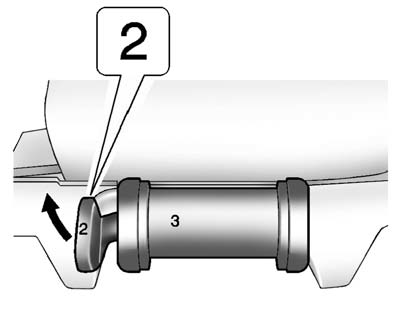
4. Unlatch the seat from the floor by lifting lever “2” next to the carrying handle on the rear of the seat, near the bottom.
5. Lift the rear of the seat up from the floor.
6. Tilt the seat fully forward to lock it into place.
7. Push and pull on the seat to make sure it is locked.
Put the seat in this position only when necessary for additional cargo space.
 Returning the Seatback to the Upright Position
To return the seatback to the upright position:
1. Open the liftgate to access the controls for the seat.
2. Raise the seatback to the upright position.
WARNING
If either seatback is not locke ...
 Returning the Third Row Seat from a Tumbled Position
To return the seat to the normal seating position:
1. Open the liftgate to access the controls for the seat.
2. Make sure there is nothing that could become trapped under the seat.
3. Release the s ...
See also:
Capacities and recommended fuel/lubricants
The following are approximate capacities. The actual refill capacities may be
a little different. When refilling, follow the procedure
instructed in the “8. Maintenance and do-it-yourself” sec ...
Care of Your CDs and DVDs
Sound quality can be reduced due to disc quality, recording method, quality of
the music recorded, and how the disc has been handled. Handle discs carefully and
store them in their original cases or ...
XM Tune Select (If Equipped)
While the XM audio screen is displaying and a song is being listened to, press
Tune Select to save that particular song.
The XM Tune Select menu displays with options to store by the song title ...


