



 Mercedes-Benz GL-Class: SmartKey
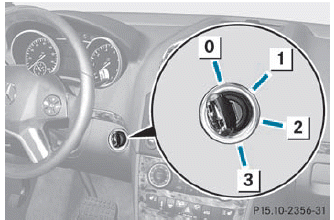
0 To remove the SmartKey
1 Power supply for some consumers, such
as the windshield wipers
2 Ignition (power supply for all consumers)
and drive position
3 To start the engine
 The SmartKey can be turned in the
ignition lock even if it is not the correct
SmartKey for the vehicle. The ignition is not
switched on. The engine cannot be started.
The SmartKey can be turned in the
ignition lock even if it is not the correct
SmartKey for the vehicle. The ignition is not
switched on. The engine cannot be started.

 KEYLESS-GO
General information
Vehicles with KEYLESS-GO are equipped with
a SmartKey featuring an integrated KEYLESSGO
function and a detachable Start/Stop
button.
The Start/Stop button must be inserted i ...
See also:
Important safety notes
DSR is an aid to assist you when driving
downhill. It keeps the speed of travel at the
speed selected on the on-board computer.
The steeper the downhill gradient, the greater
the DSR braking eff ...
Important notes on tire pressure
WARNING
If the tire pressure drops repeatedly, check
the tires for punctures from foreign objects
and/or whether air is leaking from the valves
or from around the rim.
The tire temper ...
When the System Does Not Seem To Work Properly
The RVC system might not work properly or display a clear image if:
The RVC is turned off. See “Turning the RVC System On or Off” earlier
in this section.
It is dark.
The sun or the beam ...


