



 Mercedes-Benz GL-Class: Setting the side air vents
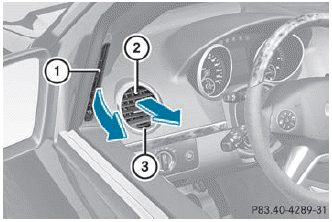
► To open/close: turn thumbwheel 3 to the left or right.
 Side window defroster vent 1 is never
completely shut, even if side air vent 2 is
shut.
Side window defroster vent 1 is never
completely shut, even if side air vent 2 is
shut.
 Setting the center air vents
1 Center air vent, left
2 Center air vent, right
3 Center vent thumbwheel, right
4 Center vent thumbwheel, left
► To open/close: turn thumbwheels 3 and 4
to the right or left. ...
 Setting the rear-compartment airvents
Setting the center vents in the rear
compartment
1 Rear-compartment air vent, left
2 Rear-compartment air vent, right
3 Rear control panel
When the climate control panel is switched
on/off, th ...
See also:
Injured persons
INFINITI recommends that injured persons
use seat belts, depending on the injury.
Check with your doctor for specific recommendations. ...
ADS (Adaptive Damping System)
ADS is continuously electronically-controlled.
It adapts the damping characteristics to suit
the current operating conditions. The
damping is controlled for each wheel
individually. This improve ...
XM Tune Select (If Equipped)
While the XM audio screen is displaying and a song is being listened to, press
Tune Select to save that particular song.
The XM Tune Select menu displays with options to store by the song title ...


