



 Buick Enclave: Remote Control
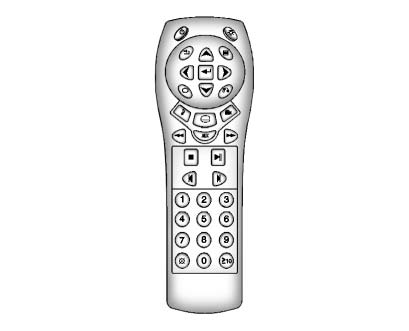
To use the remote control, aim it at the transmitter window at the rear of the overhead console and press the desired button. Direct sunlight or very bright light could affect the ability of the RSE transmitter to receive signals from the remote control. If the remote control does not seem to be working, the batteries might need to be replaced.
See “Battery Replacement” later in this section. Objects blocking the line of sight could also affect the function of the remote control.
If a CD or DVD is in the Radio DVD slot, the remote control
 button can be used to turn on the video
screen display and start the disc.
button can be used to turn on the video
screen display and start the disc.
The radio can also turn on the video screen display. See Operation for more information.
Notice: Storing the remote control in a hot area or in direct sunlight can damage it, and the repairs will not be covered by the warranty. Storage in extreme cold can weaken the batteries. Keep the remote control stored in a cool, dry place.
 Video Screen
The video screen is located in the overhead console. When the video screen is
not in use, push it up into its locked position.
To use the video screen:
1. Push the release button located on the ov ...
 Remote Control Buttons
(Power): Press to turn the video
screen on and off.
(Illumination): Press to turn the
remote control backlight on.
The backlight automatically times out after seven to 10 seconds if no other b ...
See also:
Important notes on the use of KEYLESSGO
• The KEYLESS-GO key can be used like a
conventional key.
• You can combine KEYLESS-GO functions
with those of a conventional key, e.g.
unlock with KEYLESS-GO and lock with the
& button.
...
Parking brake (red)
USA.
Canada.
Illuminates when the parking brake is correctly applied. If the lamp flashes,
a fault has been detected. Seek qualified assistance urgently. ...
Fuel-filler cap
WARNING
► Gasoline is extremely flammable and
highly explosive under certain conditions.
You could be burned or seriously
injured if it is misused or mishandled.
Always stop engine an ...


