



 Mercedes-Benz GL-Class: Parking brake
WARNING 
Engaging the parking brake while the vehicle
is in motion can cause the rear wheels to lock
up. You could lose control of the vehicle and
cause an accident. In addition, the vehicle's
brake lights do not light up when the parking
brake is engaged.
WARNING
When leaving the vehicle, always remove the
SmartKey from the starter switch, take it with
you, and lock the vehicle. Do not leave
children unattended in the vehicle, or with
access to an unlocked vehicle. Children could
release the parking brake and/or shift the
automatic transmission out of park position
P, either of which could result in an accident
and/or serious personal injury.
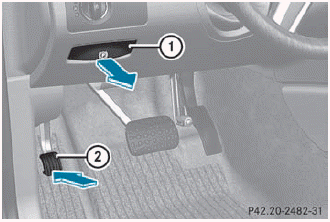
► To apply: depress parking brake 2 firmly.
When the engine is running, the  (USA
only) or
(USA
only) or  (Canada only) indicator
lamp
lights up in the instrument cluster.
(Canada only) indicator
lamp
lights up in the instrument cluster.
► To release: depress the brake pedal and keep it depressed.
► Pull release handle 1.
When the ignition is switched on or the
engine is running, the  (USA only)
or
(USA only)
or  (Canada only) indicator lamp
goes out
in the instrument cluster.
(Canada only) indicator lamp
goes out
in the instrument cluster.
 Switching off the engine
Important safety notes
WARNING
Do not turn off the engine before the vehicle
has come to a complete stop. With the engine
not running, there is no power assistance for
the brake and s ...
 Parking the vehicle for a long period
If you leave the vehicle parked for longer than
four weeks, the battery may be damaged by
exhaustive discharge.
► Connect a trickle charger.
You can obtain information about trickle
ch ...
See also:
Power Folding Mirrors
To fold the mirrors:
1. Press (C) to fold the mirrors out to the driving position.
2. Press (D) to fold the mirrors into the folded position. ...
OnStar Additional Information
Transferring Service
Push to request account transfer
eligibility information. The Advisor can assist in canceling or removing account
information. If OnStar receives information that vehicle ow ...
CD/DVD Player
The player can be used for CD, MP3, and as a DVD video player. Read this section
for more information about DVD video.
When playing an audio CD the rear seat operator can power on the RSE video scre ...


