



 Mercedes-Benz GL-Class: Override feature for the rear sidewindows
WARNING 
When children ride on the vehicle's rear seats,
activate the override switch. Otherwise, the
children could be injured, e.g. by trapping
themselves in the rear side window.
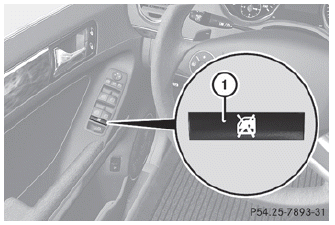
► To activate/deactivate: press switch 1.
Switch 1 is pushed in or extended. If the switch has engaged, operation of the rear side windows is deactivated. Operation is then only possible using the switches in the driver's door.
 Important safety notes
WARNING
When leaving the vehicle, always remove the
SmartKey from the ignition lock. Always take
the SmartKey with you and lock the vehicle.
Do not leave children unattended in the
ve ...
 Panic alarm
► To activate: press
button 1 for at
least one second.
An alarm sounds and the exterior lighting
flashes.
► To deactivate: press
button 1 again.
or
► Insert the SmartKe ...
See also:
Precautions on vehicle-to-vehicle distance control mode
The system is intended to enhance the
operation of the vehicle when following a
vehicle traveling in the same lane and
direction.
If the distance sensor A detects a slower
moving vehicle a ...
Trailer towing
When you attach a trailer, make sure you have
correctly established the electrical
connection. This can be accomplished by checking the trailer lighting. In this
event,
Blind Spot Assist is deact ...
115 V power socket
WARNING
The 115V AC socket operates at high voltage.
Use the 115V AC socket in the vehicle with
the same caution and prudence that you
exercise when using power outlets at home.
Keep ...


