



 Cadillac Escalade: OnStar Overview
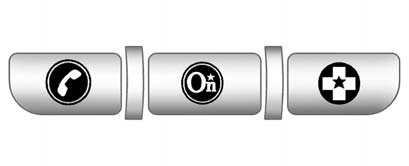
If equipped, this vehicle has a comprehensive, in-vehicle system that can connect to a live Advisor for Emergency, Security, Navigation, Connection, and Diagnostic Services.
The OnStar system status light is next to the OnStar buttons. If the status light is:
- Solid Green: System is ready.
- Flashing Green: On a call.
- Red: Indicates a problem.
Push  or call 1-888-4-ONSTAR (1-888-466-7827)
to speak to an Advisor.
or call 1-888-4-ONSTAR (1-888-466-7827)
to speak to an Advisor.
Push  to:
to:
- Make a call, end a call, or answer an incoming call.
- Give OnStar Hands-Free Calling voice commands.
- Give OnStar Turn-by-Turn Navigation voice commands. Requires the available Directions and Connections service plan.
Push to connect to a live Advisor
to:
- Verify account information or update contact information.
- Get driving directions. Requires the available Directions and Connections service plan.
- Receive On-Demand Diagnostics for a check on the vehicle’s key operating systems.
- Receive Roadside Assistance.
Push  to get a priority connection
to an Emergency Advisor available 24/7 to:
to get a priority connection
to an Emergency Advisor available 24/7 to:
- Get help for an emergency.
- Be a Good Samaritan or respond to an AMBER Alert.
- Get crisis assistance and evacuation routes.
 OnStar Overview
...
 OnStar Services
...
See also:
High-Beam On Light
The high-beam on light comes on when the high-beam headlamps are in use.
See Headlamp High/Low-Beam Changer for more information. ...
Airbag System Messages
SERVICE AIR BAG
This message displays if there is a problem with the airbag system. Have your
dealer inspect the system for problems. See Airbag Readiness Light
and Airbag System & ...
Fuse box in the cargo compartment
► Open the tailgate.
► To open: insert a suitable object, e.g.
a
coin, into the slot of release button 1 on
the cover.
► Turn release button 1 90° in the direction
of the a ...


