



 Mercedes-Benz GL-Class: Mechanical key
General notes
If the vehicle can no longer be unlocked with the SmartKey, use the mechanical key.
If you use the mechanical key to unlock and open the driver's door, the anti-theft alarm system will be triggered.
There are several ways to turn off the alarm:
► To turn the alarm off with the
SmartKey: press the  button
on the SmartKey.
button
on the SmartKey.
or
► Insert the SmartKey into the ignition
lock.
or
► To deactivate the alarm with KEYLESSGO:
press the Start/Stop button in the
ignition lock. The SmartKey must be in the
vehicle.
or
► Lock or unlock the vehicle using
KEYLESSGO.
The SmartKey must be outside the vehicle.
Removing the mechanical key
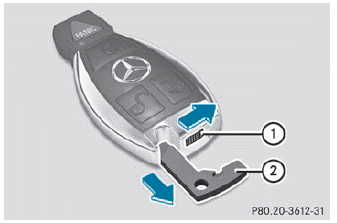
► Push release catch 1 in the direction of the arrow and at the same time, remove mechanical key 2 from the SmartKey.
 Restoring the factory settings
► Press the
buttons
simultaneously for approximately six
seconds until the battery check lamp
flashes twice. ...
 SmartKey battery
Important safety notes
It is advisable to have batteries replaced at a
qualified specialist workshop, e.g. at an
authorized Mercedes-Benz Center.
WARNING
Batteries contain toxic and c ...
See also:
Safety Belt Extender
If the vehicle's safety belt will fasten around you, you should use it.
But if a safety belt is not long enough, your dealer will order you an extender.
When you go in to order it, take the hea ...
Checklist after driving off-road
WARNING
If you notice sudden significant vibrations or
unusual handling performance or if you
suspect that damage has occurred to the
vehicle, you should activate the hazard
warning l ...
Folding the rear seats
WARNING
Never allow passengers to ride in the cargo area. In a collision, people riding
in these areas are more likely to be seriously injured or killed. Do not allow anyone
to ride in any a ...


