



 Infiniti QX: Making a call
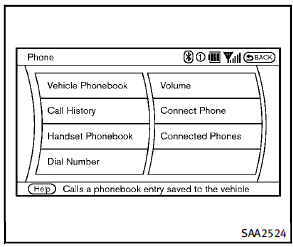
To make a call, follow this procedure.
1. Push the  button on the steering
wheel. The “PHONE” screen will appear
on the display.
2. Select the “Handset Phonebook” key
on the “PHONE” menu.
3. Select the desired entry from the list.
4. Confirm the correct entry by selecting
for the correct number from the list.
button on the steering
wheel. The “PHONE” screen will appear
on the display.
2. Select the “Handset Phonebook” key
on the “PHONE” menu.
3. Select the desired entry from the list.
4. Confirm the correct entry by selecting
for the correct number from the list.
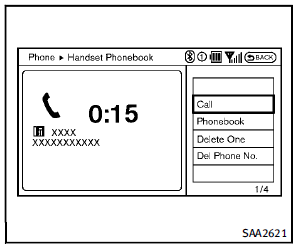
5. Select the “Call” key to start dialing the
number.
There are different methods to make a call.
Select one of the following options instead
of “Handset Phonebook” in step 2 above.
► Vehicle Phonebook
Select an entry stored in the Vehicle’s
Phonebook.
► Call History
Select an outgoing, incoming or missed
call downloaded from your cell phone
(depending on your phone’s compatibility).
► Dial Number
Input the phone number manually
using the keypad displayed on the
screen. (See “How to use touch screen”
earlier in this section.)
 Vehicle phonebook
This vehicle has two phonebooks available
for hands-free use. Depending on the
phone, the system may automatically
download the entire cell phone’s phonebook
into the “Handset Phonebook” ...
 Receiving a call
When you hear a phone ring, the display
will change to the incoming call mode. To
receive a call, perform one of the following
procedures listed below.
1. Select the “Answer” key.
2. P ...
See also:
Tire markings
1. P indicates that the tire is for passenger vehicle use.
2. The width of the tire from sidewall edge to sidewall edge in millimeters.
3. The aspect ratio, also known as the profile, gives the si ...
Starting the Vehicle
1. Aim the RKE transmitter at the vehicle.
2. Press and release .
3. Immediately after completing Step 2, press and hold
until the turn signal lamps flash.
When the vehicle starts, the parking la ...
Rear Passenger Cupholders
Pull down on the lid to access the cupholders in the rear floor console.
Vehicles with the rear seat armrest may also contain cupholders. Pull down the
armrest to use the cupholders. ...


