



 Infiniti QX: Instrument brightness control
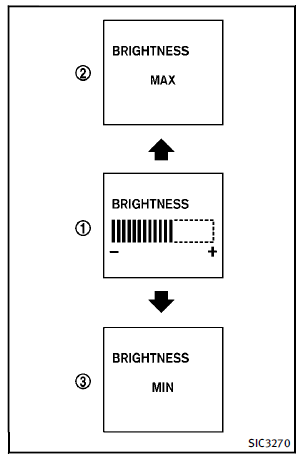
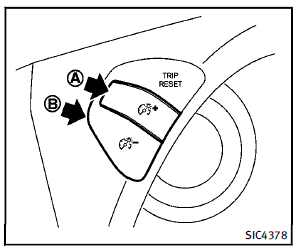
The instrument brightness control switch can be operated when the ignition switch is in the ON position. When the switch is operated, the dot matrix liquid crystal display switches to the brightness adjustment mode. Push the upper switch A to brighten the instrument panel lights. The bar1 moves to the + side. When reaching the maximum brightness, “MAX” appears on the display 2 .Push the lower switch B to dim the instrument panel lights. The bar1 moves to the − side. When reaching the minimum brightness, “MIN” appears on the display
3 . However, “MIN” does not appear during the nighttime. The dot matrix liquid crystal display returns to the normal display under the following conditions:
► when the instrument brightness control
switch is not operated for more than 5
seconds.
► when the  switch on the right
side of the combination meter panel is
pushed.
switch on the right
side of the combination meter panel is
pushed.
 Headlight washer (if so equipped)
The headlight washer operates when the
headlight is on and the ignition switch is in
the ON position.
Pull the windshield washer switch toward
you. The headlight washer operates with
the win ...
 Turn signal switch
1 Turn signal
Move the lever up or down to signal the
turning direction. When the turn is completed,
the turn signals cancel automatically.
2 Lane change signal
To indicate a lane change, ...
See also:
Important safety notes
For reasons of safety, Mercedes-Benz
recommends that you drive with the lights
switched on even during the daytime. In some
countries, operation of the headlamps varies
due to legal requirements a ...
Roller sunblind, rear panorama roof
The rear panorama roof roller sunblind
protects the vehicle occupants in the third
row of seats from direct sunlight.
You can open/close the roller sunblind by
hand.
Always guide the roller ...
Roof Rack System
WARNING
If something is carried on top of the vehicle that is longer or wider than the
roof rack—like paneling, plywood, or a mattress—the wind can catch it while the
vehicle is being driven. ...


