



 Cadillac Escalade: Heated and Ventilated Seats
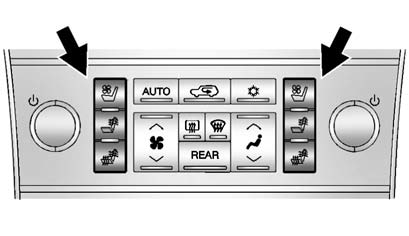
The buttons are on the climate control panel.
 : Press to cool the entire seat.
 : Press to heat the seatback only.
 : Press to heat the seat and seatback.
Press the desired button once for the highest setting. With each press of the button, the seat will change to the next lower setting, and then to the off setting. Indicator bars next to the symbol on the climate control display show the selected setting: three for high, two for medium, and one for low.
See Heated and Ventilated Front Seats .
 Third Row Seats
On vehicles with third row seats, the seatbacks can be folded, and the entire
seat can be tumbled or removed from the vehicle.
For detailed instructions, see Third Row Seats . ...
 Heated Rear Seats
The buttons are on the Rear Sear Audio (RSA) panel on the rear of the center
console.
Press or
to heat the left outboard or right
outboard seat cushion and to cycle through the temperature set ...
See also:
Using the DVD Player
The DVD player can be controlled by the buttons on the remote control, the RSA
system, or by the buttons on the radio faceplate.
See “Remote Control” under Rear Seat Entertainment (RSE) System& ...
Inserting a Disc
To play a disc, gently insert the disc, with the label side up, into the loading
slot. The DVD player might not accept some paper labeled media. The player starts
loading the disc into the system ...
No Folder
When the disc contains only compressed files, the files are located under the
root folder.
The next and previous folder function does not function on a disc that was recorded
without folders or p ...


