



 Buick Enclave: Heated and Ventilated Seats
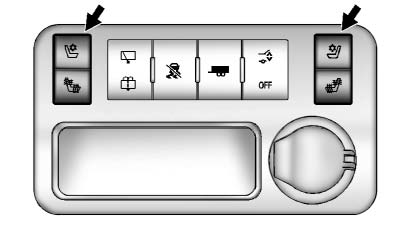
Heated and Cooled Seat Buttons Shown, Heated Seat Buttons Similar
If available, the buttons are on the center console. To operate, the engine must be running.
 : If available, press to heat the
seatback only.
: If available, press to heat the
seatback only.
 : If available, press to cool the
entire seat.
: If available, press to cool the
entire seat.
 : Press to heat the seat and seatback.
Press the button once for the highest setting. With each press of the button, the seat will change to the next lower setting, and then to the off setting. The lights indicate three for the highest setting and one for the lowest.
See Heated and Ventilated Front Seats for more information.
 Third Row Seats
The third row seatbacks can be folded forward, and the seats can be removed.
To fold the third row seatback:
1. Remove anything on or under the seat.
2. Disconnect the rear safety belt mini-latch ...
 Head Restraint Adjustment
Do not drive until the head restraints for all occupants are installed and adjusted
properly.
To achieve a comfortable seating position, change the seatback recline angle
as little as necessary w ...
See also:
If No Steam Is Coming from the Engine Compartment
The ENGINE OVERHEATED STOP ENGINE or the ENGINE OVERHEATED IDLE ENGINE message,
along with a low coolant condition, can indicate a serious problem.
If there is an engine overheat warning, but see or ...
Convenience Net
For vehicles with a convenience net in the rear, use it to store small loads
as far forward as possible.
The net should not be used to store heavy loads. ...
Navteq corporation
Please read this agreement carefully before using the Navigation System. This
is a license agreement for your copy of the Navigable Map Database, (the ‘DATABASE’)
originally made by NAVTEQ Cor ...


