



 Infiniti QX: Floor mats
 WARNING
To avoid potential pedal interference that
may result in a collision or injury:
► NEVER place a floor mat on top of
another floor mat in the driver front
position.
► Use only genuine NISSAN floor mats
specifically designed for use in your
vehicle model. See your INFINITI retailer
for more information.
► Properly position the mats in the floorwell
using the floor mat positioning aid.
See “Floor mat positioning aid” later in
this section.
The use of genuine NISSAN floor mats can
extend the life of your vehicle carpet and
make it easier to clean the interior. Mats
should be maintained with regular cleaning
and replaced if they become excessively
worn.
Floor mat positioning aid
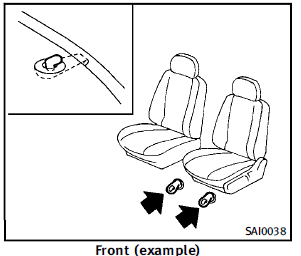
This model includes front floor mat brackets to act as floor mat positioning aid. NISSAN floor mats have been specially designed for your vehicle model. The floor mats have grommet holes in them. To install, simply position the mat by placing the floor mat bracket through the floor mat grommet hole while centering the mat in the floorwell. Periodically check to make certain that the mats are properly positioned.
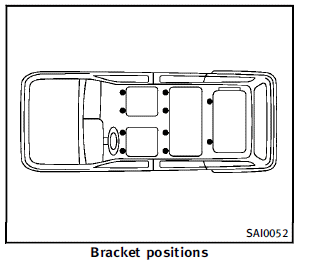
The illustration shows the location of the floor mat brackets.
 Air fresheners
Most air fresheners use a solvent that
could affect the vehicle interior. If you use
an air freshener, take the following precautions:
► Hanging-type air fresheners can cause
permanent d ...
 Seat belts
The seat belts can be cleaned by wiping
them with a sponge dampened in a mild
soap solution. Allow the belts to dry
completely before using them.
See “Seat belts” in the “1. Safety — s ...
See also:
Brake Pedal Travel
See your dealer if the brake pedal does not return to normal height, or if there
is a rapid increase in pedal travel. This could be a sign that brake service might
be required. ...
Wheels and Tires
Tires
Every new GM vehicle has high-quality tires made by a leading tire manufacturer.
See the warranty manual for information regarding the tire warranty and where
to get service. For additional ...
Root Directory
The root directory of the disc is treated as a folder. If the root directory
has compressed audio files, the directory displays as F1 ROOT on the radio.
If a disc contains both uncompressed CD audi ...


