



 Cadillac Escalade: Exterior Lamp Controls
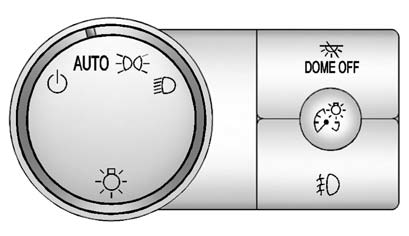
The exterior lamps control is located on the instrument panel to the left of the steering wheel.
It controls the following systems:
- Headlamps
- Taillamps
- Parking Lamps
- License Plate Lamps
- Instrument Panel Lights
The exterior lamps control has four positions:
 (Off): Turns off the automatic headlamps
and Daytime Running Lamps (DRL). Turning the headlamp control to the off position
again will turn the automatic headlamps or DRL back on.
(Off): Turns off the automatic headlamps
and Daytime Running Lamps (DRL). Turning the headlamp control to the off position
again will turn the automatic headlamps or DRL back on.
For vehicles first sold in Canada, the off position only works when the vehicle is shifted into the P (Park) position.
AUTO (Automatic): Automatically turns on the headlamps at normal brightness, together with the following:
- Parking Lamps
- Instrument Panel Lights
- Taillamps
- License Plate Lamps
 (Parking Lamps): Turns on the parking
lamps together with the following:
(Parking Lamps): Turns on the parking
lamps together with the following:
- Instrument Panel Lights
- Taillamps
- License Plate Lamps
 (Headlamps): Turns on the headlamps
together with the following:
(Headlamps): Turns on the headlamps
together with the following:
- Parking Lamps
- Instrument Panel Lights
- Taillamps
- License Plate Lamps
When the headlamps are turned on while the vehicle is on, the headlamps will turn off automatically 10 minutes after the ignition is turned off. When the headlamps are turned on while the vehicle is off, the headlamps will stay on for 10 minutes before automatically turning off to prevent the battery from being drained. Turn the headlamp control to off and then back to the headlamp on position to make the headlamps stay on for an additional 10 minutes.

 IntelliBeam® Intelligent High-Beam Headlamp Control System
For vehicles with this feature, be sure to read this entire section before using
it.
IntelliBeam is an enhancement to the vehicle's headlamp system.
Using a digital light sensor on the rearview ...
See also:
Screen modes
Touch the screen mode selection button to view a series of icons, each depicting
a different screen mode (as detailed below). Touch the relevant icon to select the
desired screen mode.
...
Manual Liftgate Operation
To unlock the liftgate, press on
the power door lock switch or press
on the Remote Keyless Entry (RKE) transmittertwice, see Remote Keyless Entry (RKE)
System Operation .
Press the touch p ...
Limitations of use
The DATABASE is restricted for use in the specific system for which it was created.
Except to the extent explicitly permitted by mandatory applicable laws, you may
not extract or re-utilize substa ...


