



 Mercedes-Benz GL-Class: Door control panel
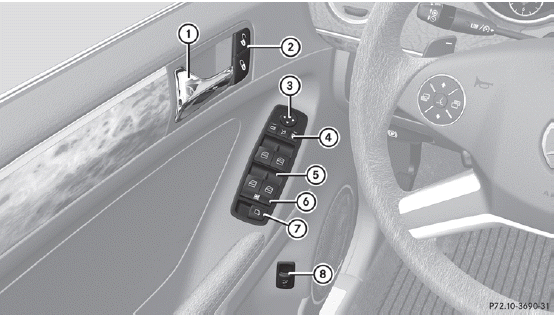
1 Opens the door
2  Unlocks/locks the vehicle
3  Adjusts the exterior mirrors
4  Selects the exterior mirror,
electrically folds the exterior mirrors in/out
Selects the exterior mirror,
electrically folds the exterior mirrors in/out
5  Opens/closes the side windows
6  Activates/deactivates the
override feature for the side windows in the rear compartment
Activates/deactivates the
override feature for the side windows in the rear compartment
7  Opens/closes the hinged power
side windows
Opens/closes the hinged power
side windows
8  Opens/closes the tailgate
 Overhead control panel
1 Switches the lefthand
reading lamp on/off
2 Switches the rear
interior lighting on/off
3 Switches the
automatic interior lighting
control on/off
4 Switches the front
interior lighti ...
 Safety
...
See also:
Qualified specialist workshop
An authorized Mercedes-Benz Center is a
qualified specialist workshop. It has the
necessary specialist knowledge, tools and
qualifications to correctly carry out the work
required on your vehicle. ...
Instrument Panel Storage
This vehicle has an instrument panel storage area (A). To open the cover, press
the button.
The vehicle may have an auxiliary input jack located on the lower right side
of the faceplate and for ...
Vehicle Identification Number (VIN)
This legal identifier is in the front corner of the instrument panel, on the
left side of the vehicle. It can be seen through the windshield from outside. The
VIN also appears on the Vehicle Cer ...


