



 Mercedes-Benz GL-Class: Adjusting the exterior mirrors
WARNING 
Exercise care when using the passenger-side
exterior rear view mirror. The mirror surface
is convex (outwardly curved surface for a
wider field of view). Objects in mirror are
closer than they appear. Check your interior
rear view mirror and glance over your
shoulder before changing lanes.
The exterior mirrors are automatically heated if the rear window defroster is switched on and the outside temperature is low.
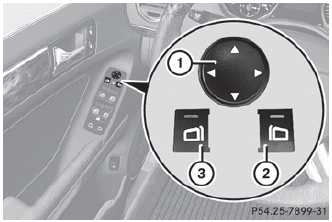
► Make sure that the SmartKey is in position 1 or 2 in the ignition lock.
► Press button 2 for the right-hand exterior mirror or button 3 for the left-hand exterior mirror.
The indicator lamp in the corresponding button lights up in red.
The indicator lamp goes out again after some time. You can adjust the selected mirror using adjustment button 1 as long as the indicator lamp is lit.
► Press adjustment button 1 up, down, to the right or to the left until the exterior mirror is set to a position that provides you with a good overview of traffic conditions.
 Exterior mirrors
...
 Folding the exterior mirrors in or outelectrically
► Make sure that the SmartKey is in
position
1 or 2 in the ignition lock.
► Briefly press button 1.
Both exterior mirrors fold in or out.
Make sure that the exterior mirrors are ...
See also:
Recirculation
When selected, the air is inside of the screen. recirculated inside the vehicle.
This helps to maintain a high or low temperature, and is useful for preventing fumes
entering the vehicle.
Note: ...
Setting DSR
With the DSR speed function, you can set the
speed of DSR (the speed for driving downhill) to a value between 3 mph (Canada: 4 km/h) and 10 mph (Canada:
18 km/h). The adjustments are made in
1-mp ...
Additives in gasoline
One of the major problems with poor quality
fuels is the creation of carbon deposits during
the combustion process. Mercedes-Benz
recommends that you use fuel brands
containing additives that prev ...


