



 Cadillac Escalade: Transmission
Driver Shift Control (DSC)
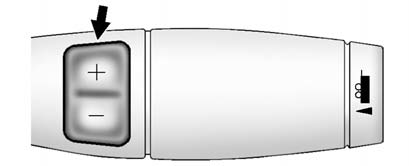
The DSC switch is located on the shift lever.
To enable the DSC feature:
1. Move the column shift lever to the M(Manual) position. The Driver Information Center (DIC) display will show the message MANUAL SHIFT on the first line and the current gear will be displayed on the second line. This is the highest attainable range with all lower gears accessible. As an example, when 5 (Fifth) gear is selected, 1 (First) through 5 (Fifth) gears are available.
2. Press the plus/minus buttons, located on the steering column shift lever, to select the desired range of gears for current driving conditions. See Manual Mode .
While using DSC, cruise control and the tow/haul mode can be used.
Grade Braking is not available when DSC is active. See Tow/Haul Mode .
 Climate Controls
The heating, cooling, and ventilation in the vehicle can be controlled with this
system.
Climate Control with Cooled and Heated Seats shown
A. Driver and Passenger Temperature Controls
B. AUTO ( ...
 Vehicle Features
...
See also:
Sunglasses holder
WARNING
Keep the sunglasses holder closed while
driving to prevent an accident.
To open the sunglasses holder, push 1 .
CAUTION
► Do not use for anything other than
glasses.
...
Adjusting the steering wheel
WARNING
Never adjust the steering column while the vehicle is in motion. Doing so may
cause a loss of control, potentially resulting in an accident.
1. Electric adjustment: Move the control ...
Recreational Vehicle Towing
If the vehicle is a hybrid, see the hybrid supplement for more information.
Recreational vehicle towing means towing the vehicle behind another vehicle –
such as behind a motorhome. The two most c ...


