



 Mercedes-Benz GL-Class: Stowage compartments in the front
Glove box
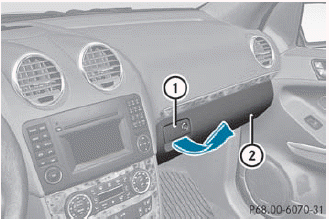
► To open: pull handle 1 and open glove
box
flap 2.
► To close: fold glove box flap 2 upwards
until it engages.
The glove box can only be locked and unlocked using the mechanical key.
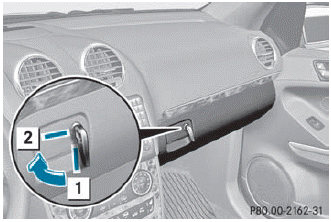
1 Glove box unlocked
2 Glove box locked
Stowage compartment in the center console
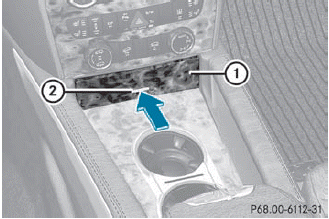
► To open: briefly press marking 2.
► To close: push stowage compartment 1
in the direction of the arrow until it
engages.
Stowage compartment under the armrest
 The
The  Roadside
Assistance call button and
Roadside
Assistance call button and  MB Info call button are
located in the stowage compartment under
the armrest.
MB Info call button are
located in the stowage compartment under
the armrest.
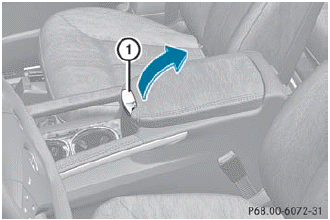
► To open: pull handle 1 and fold the armrest upwards.
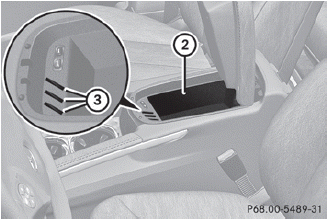
Coin holders 3 are located in front of stowage compartment 2.
 Stowage compartments
Important safety notes
WARNING
To help avoid personal injury during a collision
or sudden maneuver, exercise care when
storing objects in the vehicle. Put luggage or
cargo in the carg ...
 Stowage compartments in the rear
Stowage compartment in the rear center
console
► To open: briefly press the stowage
compartment marking.
Depending on the vehicle's equipment,
there may be open stowage spaces above
and ...
See also:
Reformulated gasoline
Fuels specially formulated to further reduce vehicle emissions are available
from some gasoline companies. Land Rover recommends the use of reformulated gasoline
where available. ...
Engine compartment check locations
VK56VD ENGINE MODEL
1. Window washer fluid reservoir
2. Fuse/fusible link holder
3. Engine oil dipstick
4. Power steering fluid reservoir
5. Engine oil filler cap
6. Brake fluid reservoir ...
Diagnostics
OnStar Vehicle Diagnostics will perform a vehicle check every month. It will
check the engine, transmission, antilock brakes, and major vehicle systems. It also
checks the tire pressures, if the veh ...


