



 Mercedes-Benz GL-Class: SmartKey
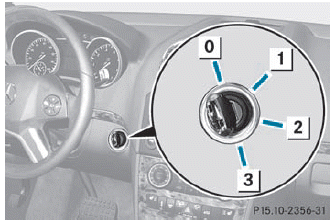
0 To remove the SmartKey
1 Power supply for some consumers, such
as the windshield wipers
2 Ignition (power supply for all consumers)
and drive position
3 To start the engine
 The SmartKey can be turned in the
ignition lock even if it is not the correct
SmartKey for the vehicle. The ignition is not
switched on. The engine cannot be started.
The SmartKey can be turned in the
ignition lock even if it is not the correct
SmartKey for the vehicle. The ignition is not
switched on. The engine cannot be started.

 KEYLESS-GO
General information
Vehicles with KEYLESS-GO are equipped with
a SmartKey featuring an integrated KEYLESSGO
function and a detachable Start/Stop
button.
The Start/Stop button must be inserted i ...
See also:
Parking the vehicle for a long period
If you leave the vehicle parked for longer than
four weeks, the battery may be damaged by
exhaustive discharge.
► Connect a trickle charger.
You can obtain information about trickle
ch ...
Dome Lamps
The dome lamps are located in the overhead console.
They come on when any door is opened and turn off after all the doors are closed.
Turn the instrument panel brightness knob located below the dome ...
Fuel System Messages
FUEL LEVEL LOW
This message displays and a chime sounds if the fuel level is low. Refuel as
soon as possible.
See Fuel Gauge and Fuel for more information.
TIGHTEN GAS CAP
This messa ...


