



 Buick Enclave: Remote Keyless Entry (RKE) System
The RKE transmitter is used to remotely lock and unlock the doors from up to 60 m (195 ft) away from the vehicle.
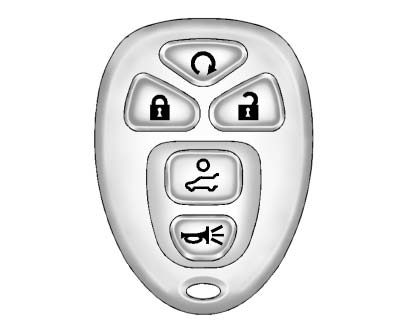
Press  to unlock the driver door.
Press  again within five seconds
to unlock all remaining doors.
again within five seconds
to unlock all remaining doors.
Press  to lock all doors.
Lock and unlock feedback can be personalized.
To open or close the liftgate, press and hold
 until the liftgate begins to move.
Press  and release to locate the
vehicle.
and release to locate the
vehicle.
Press  and hold for more than two
seconds to sound the panic alarm.
and hold for more than two
seconds to sound the panic alarm.
Press  again to cancel the panic
alarm.
again to cancel the panic
alarm.
See Remote Keyless Entry (RKE) System Operation .
 Initial Drive Information
This section provides a brief overview about some of the important features that
may or may not be on your specific vehicle.
For more detailed information, refer to each of the features which can b ...
 Remote Vehicle Start
Starting the Vehicle
With this feature the engine can be started from outside of the vehicle.
1. Aim the RKE transmitter at the vehicle.
2. Press and release
3. Immediately after completing Step ...
See also:
Fuel tank capacity
Avoid the risk of running out of fuel and never intentionally drive the vehicle
when the fuel gauge indicates that the tank is empty. When refueling your vehicle
after the fuel gauge reads empty, ...
Trailer stability assist (TSA)
Note: This feature may not operate with all trailer designs.
NOTICE
Trailer Stability Assist (TSA) will not operate in the event of the trailer jack-knifing.
NOTICE
The ability of the sy ...
Cargo floor box
Push the handle to open the cargo floor
board 1 . ...


