



 Cadillac Escalade: Reclining Seatbacks
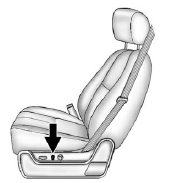
To adjust the seatback:
- Tilt the top of the control rearward to recline.
- Tilt the top of the control forward to raise.
See Reclining Seatbacks .
 Lumbar Adjustment
To adjust the lumbar support:
Press and hold the front or rear of the control to increase or decrease
lumbar support.
Press and hold the top or bottom of the control to raise or lower the
...
 Memory Features
The controls on the driver door are used to program and recall memory settings
for the driver seat, outside mirrors, power steering column, and the adjustable
throttle and brake pedals. ...
See also:
Dot matrix liquid crystal display
The dot matrix liquid crystal display
appears in the vehicle information display
1 located between the speedometer and
odometer, and shows the indicators for the
driving systems, Intelligent ...
Remote Vehicle Start
With this feature the engine can be started from outside of the vehicle. ...
Cleaning the seat covers
Do not use microfiber cloths to clean
genuine leather, artificial leather or
Alcantara® covers. If used often, these can
damage the cover.
Observe the following when cleaning:
• clean genu ...


