



 Infiniti QX: Intelligent Key
Your vehicle can only be driven with the Intelligent Keys which are registered to your vehicle’s Intelligent Key system components and INFINITI Vehicle Immobilizer System components. As many as 4 Intelligent Keys can be registered and used with one vehicle. The new keys must be registered by an INFINITI retailer prior to use with the Intelligent Key system and INFINITI Vehicle Immobilizer System of your vehicle. Since the registration process requires erasing all memory in the Intelligent Key components when registering new keys, be sure to take all Intelligent Keys that you have to the INFINITI retailer.
 CAUTION
► Be sure to carry the Intelligent Key with
you when driving. The Intelligent Key is a
precision device with a built-in transmitter.
To avoid damaging it, please note
the following.
— The Intelligent Key is water resistant;
however, wetting may damage
the Intelligent Key. If the Intelligent
Key gets wet, immediately wipe until
it is completely dry.
— Do not bend, drop or strike it
against another object.
— If the outside temperature is below
148F (−108C), the battery of the
Intelligent Key may not function
properly.
— Do not place the Intelligent Key for
an extended period in a place where
temperatures exceed 1408F (608C).
— Do not change or modify the Intelligent
Key.
— Do not use a magnet key holder.
— Do not place the Intelligent Key near
an electric appliance such as a
television set or personal computer.
— Do not allow the Intelligent Key to
come into contact with water or salt
water, and do not wash it in a
washing machine. This could affect
the system function.
► If an Intelligent Key is lost or stolen,
INFINITI recommends erasing the ID code
of that Intelligent Key. This will prevent
the Intelligent Key from unauthorized
use to unlock the vehicle. For information
regarding the erasing procedure,
please contact an INFINITI retailer.
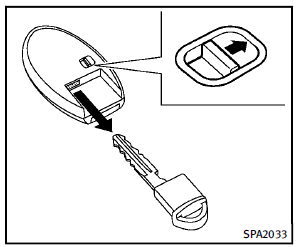
Mechanical key
To remove the mechanical key, release the lock knob at the back of the Intelligent Key. To install the mechanical key, firmly insert it into the Intelligent Key until the lock knob returns to the lock position. Use the mechanical key to lock or unlock the doors and the glove box. See “Doors” later in this section, “Storage” in the “2. Instruments and controls” section.
CAUTION
Always carry the mechanical key installed in
the Intelligent Key.
 Keys
Keys
A key number plate is supplied with your
keys. Record the key number and keep it in
a safe place (such as your wallet), not in
the vehicle. If you lose your keys, see an
INFINITI retailer for ...
 Valet hand-off
When you have to leave a key with a valet,
give them the Intelligent Key itself and
keep the mechanical key with you to
protect your belongings.
To prevent the glove box from being
opened du ...
See also:
Useful information
This Operator's Manual describes all
models and all standard and optional
equipment of your vehicle available at the
time of publication of the Operator's
Manual. Country-specific differences are ...
Exterior Lighting
The exterior lamps control is located on the instrument panel to the left of
the steering wheel.
: Turns off the automatic headlamps
and Daytime Running Lamps (DRL). Turning the headlamp control ...
Cleaning the sensors
NOTICE
When washing the vehicle do not aim high pressure water jets directly at the
sensors. Do not use abrasive materials or hard/sharp objects to clean the sensors.
Only use approved vehic ...


