



 Cadillac Escalade: Heated Rear Seats
 WARNING
If you cannot feel temperature change or pain to the skin, the seat heater may cause burns even at low temperatures. See the Warning under Heated and Ventilated Front Seats .
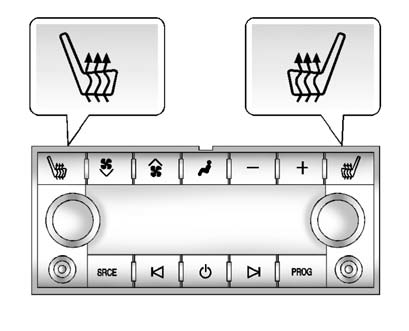
The buttons are on the Rear Seat Audio (RSA) panel on the rear of the center console.
Press  or
or
 to heat the left outboard or right
outboard seat cushion. An indicator on the RSA display appears when this feature
is on.
to heat the left outboard or right
outboard seat cushion. An indicator on the RSA display appears when this feature
is on.
Press the button once for the highest setting. With each press of the button, the heated seat changes to the next lower setting, and then the off setting. Indicator bars next to the symbol show the setting: three for high, two for medium, and one for low.
The heated seats are canceled ten seconds after the ignition is turned off. To use this feature after the vehicle is restarted, press the desired button.
 Rear Seats
...
 Second Row Seats
The second row seats can be folded for additional cargo space or folded and tumbled
for easy entry and exit to the third row seat, if equipped. The seat has either
the manual fold and tumble feature ...
See also:
Dynamic response
The dynamic response system adjusts the suspension to eliminate or reduce body
roll while cornering on-road, and to provide greater axle articulation and improved
traction when driving off-road.
...
Road testing dynamometers (rolling roads)
It is essential that any dynamometer testing is carried out only by a qualified
person, familiar with the dynamometer testing and safety procedures practiced by
Land Rover Retailer/ Authorized Rep ...
Side Blind Zone Alert (SBZA)
If available, this feature will alert you to vehicles located in the vehicle's
side blind zone. When the system detects a vehicle in the side blind zone, the SBZA
display will light up in the co ...


