



 Infiniti QX: Door locks/unlocks precaution
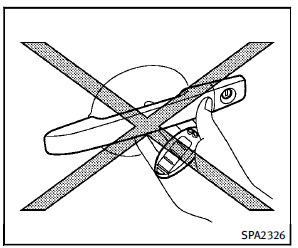
► Do not push the door handle request
switch with the Intelligent Key held in
your hand as illustrated. The close
distance to the door handle will cause
the Intelligent Key system to have
difficulty recognizing that the Intelligent
Key is outside the vehicle.
► After locking with the door handle
request switch, verify the doors are
securely locked by testing them.
► To prevent the Intelligent Key from
being left inside the vehicle, make sure
you carry the key with you and then
lock the doors.
► Do not pull the door handle before
pushing the door handle request
switch. The door will be unlocked but
will not open. Release the door handle
once and pull it again to open the door.
► The Intelligent Key system (opening/
closing doors with the door handle
request switch) can be set to remain
inactive. (See “Vehicle information and
settings” in the “4. Monitor, climate,
audio, phone and voice recognition
systems” section.)
 Intelligent Key operating range
The Intelligent Key functions can only be
used when the Intelligent Key is within the
specified operating range from the request
switch 1 .
When the Intelligent Key battery is discharged
o ...
 Intelligent Key operation
You can lock or unlock the doors without
taking the key out from your pocket or bag.
When you carry the Intelligent Key with
you, you can lock or unlock all doors by
pushing the door handle ...
See also:
Liftgate
The liftglass or liftgate cannot be opened if the rear wiper is in motion. Attempting
to open the liftglass or liftgate while the rear wiper is in motion will cause the
release of the liftglass or ...
SNOW mode
For driving or starting the vehicle on snowy
roads or slippery areas, turn the SNOW
mode on.
To turn the SNOW mode on, push the
SNOW mode switch. The SNOW mode
indicator light on the meter ...
Limited Warranty
Follow the instructions in this manual
about the proper operation of your vehicle
as well as about possible vehicle damage.
Damage to your vehicle that arises from
culpable contraventions agai ...


