



 Mercedes-Benz GL-Class: Door control panel
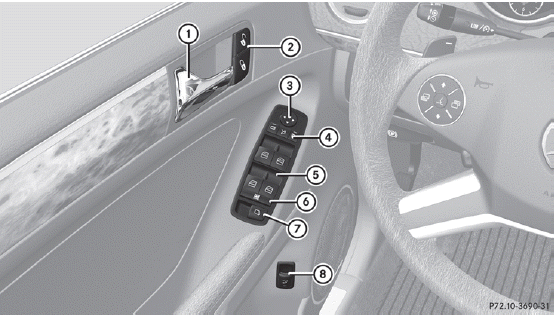
1 Opens the door
2  Unlocks/locks the vehicle
3  Adjusts the exterior mirrors
4  Selects the exterior mirror,
electrically folds the exterior mirrors in/out
Selects the exterior mirror,
electrically folds the exterior mirrors in/out
5  Opens/closes the side windows
6  Activates/deactivates the
override feature for the side windows in the rear compartment
Activates/deactivates the
override feature for the side windows in the rear compartment
7  Opens/closes the hinged power
side windows
Opens/closes the hinged power
side windows
8  Opens/closes the tailgate
 Overhead control panel
1 Switches the lefthand
reading lamp on/off
2 Switches the rear
interior lighting on/off
3 Switches the
automatic interior lighting
control on/off
4 Switches the front
interior lighti ...
 Safety
...
See also:
Event Data Recorders
This vehicle has an Event Data Recorder (EDR). The main purpose of an EDR is
to record, in certain crash or near crash-like situations, such as an airbag deployment
or hitting a road obstacle, data ...
Using Your Stored Preset Destinations
These destinations are available for selection while driving.
1. Press to turn the system on.
2. A caution may appear. Press OK to proceed.
3. Press DEST.
4. Select one of the available preset de ...
Programming Transmitters to the Vehicle
Only RKE transmitters programmed to this vehicle will work. If a transmitter
is lost or stolen, a replacement can be purchased and programmed through your dealer.
When the replacement transmitter is ...


