



 Mercedes-Benz GL-Class: Center console, upper section
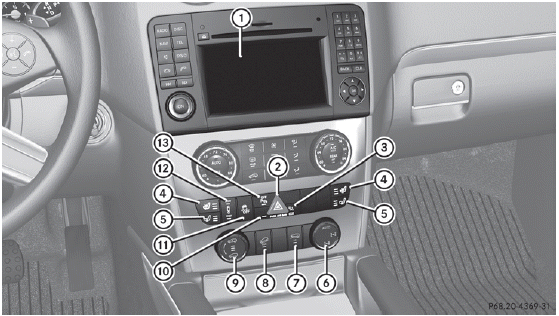
 Vehicles with the Off-Road Pro
engineering package
Vehicles with the Off-Road Pro
engineering package
1 Audio system/COMAND;
see separate operating
instructions
2  Hazard warning
lamps
Hazard warning
lamps
3  Indicator
lamp
Indicator
lamp
4  Seat heating
5  Seat ventilation
6  Engages the differential locks
7  LOW RANGE off-road gear
8  Downhill Speed
Regulation
Downhill Speed
Regulation
9  Level control
10 ATA indicator lamp
11  ESP®
ESP®
12  Adaptive Damping
System
Adaptive Damping
System
13  PARKTRONIC
 Center console
...
 Center console, lower section
14 Ashtray
Cigarette lighter
15 Stowage compartment
16 Cup holder ...
See also:
Notes on the oil level
Depending on the driving style, the vehicle
consumes up to 0.9 US qts. (0.8 l) of oil over
a distance of 600 miles (1000 km). The oil
consumption may be higher than this when
the vehicle is new or ...
New Vehicle Break-In
Notice: The vehicle does not need an elaborate break-in. But it will perform
better in the long run if you follow these guidelines:
Keep the vehicle speed at 88 km/h (55 mph) or less for the firs ...
Tire Rotation
Tires should be rotated every 12 000 km (7,500 mi).
See Maintenance Schedule .
Tires are rotated to achieve a uniform wear for all tires.
The first rotation is the most important.
Any time unusual ...


