



 Cadillac Escalade: Tire and Loading Information Label
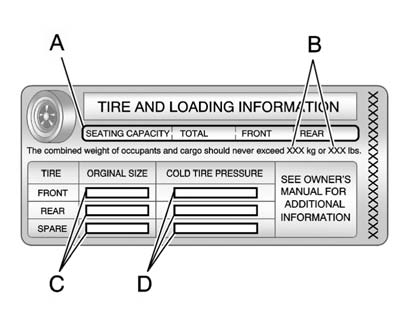
Label Example
A vehicle specific Tire and Loading Information label is attached to the center pillar (B-pillar). With the driver door open, you will find the label attached below the door lock post (striker). The tire and loading information label shows the number of occupant seating positions (A), and the maximum vehicle capacity weight (B) in kilograms and pounds.
The Tire and Loading Information label also shows the size of the original equipment tires (C) and the recommended cold tire inflation pressures (D). For more information on tires and inflation see Tires and Tire Pressure .
 Vehicle Load Limits
It is very important to know how much weight your vehicle can carry. This weight
is called the vehicle capacity weight and includes the weight of all occupants,
cargo, and all nonfactory-installed o ...
 There is also important loading information on the vehicle Certification/Tire
label. It tells you the Gross Vehicle Weight Rating (GVWR) and the Gross Axle Weight
Rating (GAWR) for the front and rea
There is also important loading information on the vehicle Certification/Tire
label. It tells you the Gross Vehicle Weight Rating (GVWR) and the Gross Axle Weight
Rating (GAWR) for the front and rea
Steps for Determining Correct Load Limit
1. Locate the statement “The combined weight of occupants and cargo should never
exceed XXX kg or XXX lbs” on your vehicle's placard.
2. Determine t ...
See also:
Exhaust gas (carbon monoxide)
WARNING
► Do not breathe exhaust gases; they
contain colorless and odorless carbon
monoxide. Carbon monoxide is dangerous.
It can cause unconsciousness or
death.
► If you susp ...
Replacing the Engine Air Cleaner/ Filter
1. Locate the air cleaner/filter assembly. See Engine Compartment Overview
.
2. Loosen the four screws on the cover of the housing and lift up the cover.
3. Remove the engine air cleaner/ ...
Roller sunblind, rear panorama roof
The rear panorama roof roller sunblind
protects the vehicle occupants in the third
row of seats from direct sunlight.
You can open/close the roller sunblind by
hand.
Always guide the roller ...


