



 Cadillac Escalade: XM Tune Select (If Equipped)
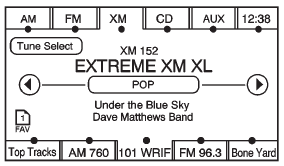
While the XM audio screen is displaying and a song is being listened to, press Tune Select to save that particular song.
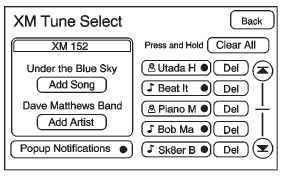
The XM Tune Select menu displays with options to store by the song title or the artist's name. Up to 10 favorites by song title or artist can be saved.
Add Song: Press to save the song that is currently playing by the song title.
Add Artist: Press to save the song that is currently playing by the artist's name.
Clear All: Press and Hold the Clear All screen button to clear the stored favorite songs.
Del: Press the Del screen button to del the song that is associated to that button.
Popup Notifications: Once a song or songs are stored, a notification popup alerts the listener if a stored song is playing. Press to turn notification on or off.
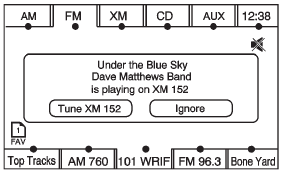
While a notification popup alert screen displays, press the screen button showing the station or press Ignore.
 Finding a Station
AM Source Shown, Other Sources Similar
If viewing a map screen, press the source screen (AM, FM, XM (if equipped), CD,
etc.) button. The display splits between the audio screen and the map screen. ...
 Storing Radio Station Presets
This feature stores a mix of up to 30 AM, FM, and XM (if equipped) preset stations.
To store presets:
1. Press to turn the system on.
2. If viewing a map screen, press AUDIO, FAV or press the sour ...
See also:
Hill and Mountain Roads
Driving on steep hills or through mountains is different than driving on flat
or rolling terrain. Tips for driving in these conditions include:
Keep the vehicle serviced and in good shape.
Chec ...
Playing a CD-R or CD-RW MP3
(Tune): Turn to select MP3/WMA
files.
SEEK: Press to go to the start
of the track, if more than 10 seconds have played. Press and hold or press multiple
times to continue moving backward thro ...
Automatic Operation
AUTO (Automatic): When automatic operation is active the system will control
the inside temperature, the air delivery, and the fan speed.
Use the steps below to place the entire system in automatic ...


