



 Buick Enclave: Universal Remote System Operation
Using Universal Remote
Press and hold the appropriate Universal Remote button for at least half of a second. The indicator light will come on while the signal is being transmitted.
Erasing Universal Remote Buttons
All programmed buttons should be erased when the vehicle is sold or the lease ends.
To erase all programmed buttons on the Universal Remote device:
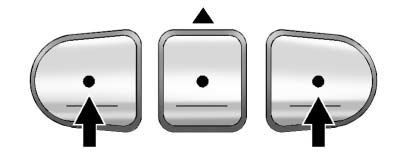
1. Press and hold down the two outside buttons until the indicator light begins
to flash, after 20 seconds.
2. Release both buttons.
Reprogramming a Single Universal Remote Button
To reprogram any of the three Universal Remote buttons, repeat the programming instructions earlier in this section, beginning with Step 2.
For help or information on the Universal Home Remote System, call the customer assistance phone number under Customer Assistance Offices (U.S. and Canada) or Customer Assistance Offices (Mexico) .
 Universal Remote System Programming
This system provides a way to replace up to three remote control transmitters
used to activate devices such as garage door openers, security systems, and home
automation devices.
Do not use the ...
 Lighting
...
See also:
Folding the rear bench seat back
► Pull release catch 3 upwards.
► Fold backrest 2 backwards until it
engages, making sure not to trap the seat
belts while doing so.
► Fold seat cushion 1 backwards and push
u ...
SmartKey battery
Important safety notes
It is advisable to have batteries replaced at a
qualified specialist workshop, e.g. at an
authorized Mercedes-Benz Center.
WARNING
Batteries contain toxic and c ...
General Information
For service and parts needs, visit your dealer. You will receive genuine GM parts
and GM-trained and supported service people.
Genuine GM parts have one of these marks:
...


