



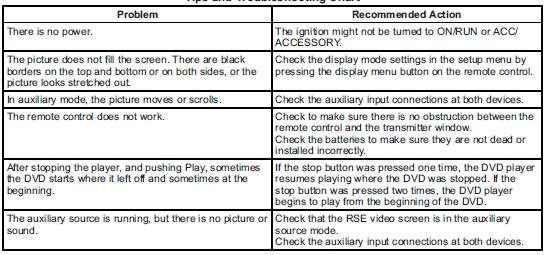
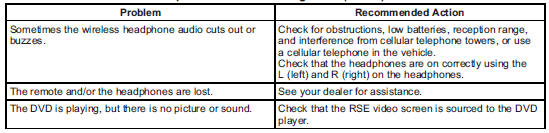
 Cadillac Escalade: Tips and Troubleshooting Chart
 Battery Replacement
To change the remote control batteries:
1. Slide the rear cover back on the remote control.
2. Replace the two batteries in the compartment. Make sure they are installed
correctly using the diagram ...
 DVD Display Error Messages
The DVD display error message depends on the radio that is in the vehicle. The
video screen can display one of the following:
Disc Load/Eject Error: This message displays when there are disc load or ...
See also:
Parking brake
WARNING
► Be sure the parking brake is fully
released before driving. Failure to do so
can cause brake failure and lead to an
accident.
► Do not release the parking brake from
...
General notes
Differential locks are available only in
vehicles with the Off-Road Pro engineering
package.
Your vehicle is equipped with the following:
• A differential lock for the transfer box:
this
...
Position of the steering wheel when theEASY-ENTRY/EXIT feature is active
The steering wheel swings upwards when
you:
• remove the SmartKey from the ignition
lock
• open the driver's door and KEYLESS-GO is
in position 1
• open the driver's door and the SmartK ...


