



 Buick Enclave: Storage Compartments
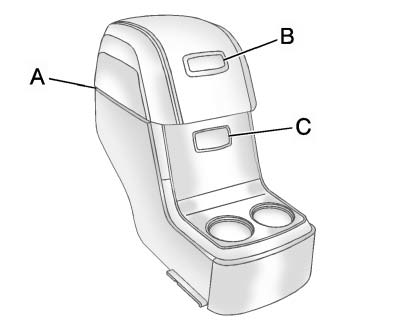
For vehicles with a second row center console, press the buttons (B) or (C) to access storage areas.
Lift up on (A) for additional storage area.
See Floor Console Storage .
 Ultrasonic Parking Assist
If available, Ultrasonic Rear Parking Assist (URPA) uses sensors on the rear
bumper to detect objects while parking the vehicle. It operates at speeds less than
8 km/h (5 mph).
URPA uses audible ...
 Power Outlets
The vehicle has 12-volt accessory power outlets which can be used to plug in
electrical equipment, such as a cell phone or MP3 player.
The power outlets are located:
► On the instrument pane ...
See also:
INFINITI Vehicle Immobilizer System
The INFINITI Vehicle Immobilizer System
will not allow the engine to start without
the use of the registered Intelligent Key.
Never leave these keys in the vehicle.
This device complies with P ...
Root Directory
The root directory is treated as a folder. If the root directory has compressed
audio files, the directory displays as No Folder or ALL. ...
Notes on regularly inspecting wheelsand tires
WARNING
Regularly check the tires for damage.
Damaged tires can cause tire inflation
pressure loss. As a result, you could lose
control of your vehicle.
Worn, old tires can cause acci ...


