



 Mercedes-Benz GL-Class: Releasing the cargo net
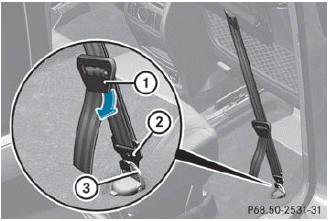
Seat belt reel holder behind the front seats
► Pull belt adjuster 1 upwards in the
direction of the arrow to reduce the tension
on the tensioning strap.
► Unhook belt hook 2 from cargo tie-down
ring 3.
 Tightening the cargo net
Seat belt reel holder behind the front seats
► Insert belt hook 1 into cargo tie-down
ring 2 in the direction of the arrow.
► Pull tensioning strap 3 by the loose end
in
the direct ...
 Detaching and storing the cargo net
► Detach guide rod ; from bracket
1.
► Press the red button on the upper and
lower
guide rods.
► Fold the cargo net and roll it up.
► Close the two Velcro fastene ...
See also:
Steering, Suspension, and Chassis Components
Visually inspect front and rear suspension and steering system for damaged, loose,
or missing parts or signs of wear. Inspect the power steering for proper hook-up,
binding, leaks, cracks, chafing, ...
If your vehicle is stolen
If your vehicle is stolen, you should change
the codes of any non-rolling code device
that has been programmed into
HomeLink®. Consult the Owner’s Manual
of each device or call the manufact ...
Lift gate
WARNING
► Always be sure the lift gate has been
closed securely to prevent it from opening
while driving.
► Do not drive with the lift gate open. This
could allow dangerous exha ...


