



 Infiniti QX: Receiving a call
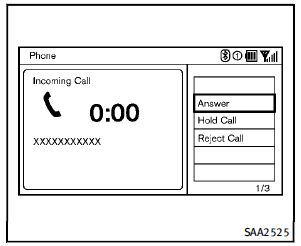
When you hear a phone ring, the display
will change to the incoming call mode. To
receive a call, perform one of the following
procedures listed below.
1. Select the “Answer” key.
2. Push the  button on the steering
wheel.
There are some options available when
receiving a call. Select one of the following
displayed on the screen.
button on the steering
wheel.
There are some options available when
receiving a call. Select one of the following
displayed on the screen.
► Answer
Accept an incoming call to talk.
► Hold Call
Put an incoming call on hold.
► Reject Call
Reject an incoming call.
To finish the call, perform one of the
following procedures listed below.
1. Select the “Hang up” key.
2. Push the button on the steering
wheel.
 Making a call
To make a call, follow this procedure.
1. Push the button on the steering
wheel. The “PHONE” screen will appear
on the display.
2. Select the “Handset Phonebook” key
on the “PHO ...
 During a call
There are some options available during a
call. Select one of the following displayed
on the screen if necessary.
► Hang up
Finish the call.
► Use Handset
Transfer the call to th ...
See also:
Doing Your Own Service Work
WARNING
You can be injured and the vehicle could be damaged if you try to do service
work on a vehicle without knowing enough about it.
► Be sure you have sufficient knowledge, experience, t ...
Seat belt locking mechanism
The rear outer seat belts and front passenger seat belts have a locking mechanism
which improves the retention of child seats. The procedure to install a child seat
is as follows:
1. Place the ch ...
SBZA Detection Zones
The SBZA sensor covers a zone of approximately one lane over from both sides
of the vehicle, 3.5m (11 ft). This zone starts at each side mirror and goes back
approximately 5.0m(16 ft). The height ...


