



 Infiniti QX: Rear
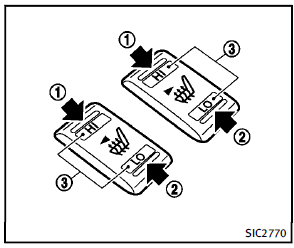
The 2nd row outboard seats are warmed by built-in heaters. The switches located on the back side of the center console can be operated independently of each other.
1. Start the engine.
2. Select heat range.
1 For high heat, push the HI (High)
side of the switch.
2 For low heat, push the LO (Low) side
of the switch.
The indicator light in the switch3 will
illuminate when the heater is on.
3. To turn off the heater, return the switch
to the level position. Make sure the
indicator light goes off.
The heater is controlled by a thermostat,
automatically turning the heater
on and off. The indicator light will
remain on as long as the switch is on.
When the vehicle’s interior is warmed,
or before you leave the vehicle, be sure
to turn off the switch.
 Front
Front
The front seats can be warmed by built-in
heaters. The switches located on the
instrument panel can be operated independently
of each other.
1. Start the engine.
2. Select heat range.
&# ...
 Climate controlled seats (if so equipped)
The climate controlled seat warms up or
cools down the front seats by blowing
warm or cool air from the surface of the
seat. The switches located on the instrument
panel can be operated inde ...
See also:
Fabric/Carpet
Start by vacuuming the surface using a soft brush attachment. If a rotating brush
attachment is being used during vacuuming, only use it on the floor carpet. Before
cleaning, gently remove as much o ...
File System and Naming
The song name that displays is the song name that is contained in the ID3 tag.
If the song name is not present in the ID3 tag, then the radio displays the file
name without the extension (such as .m ...
Starting the engine
WARNING
Never start the engine and leave it running when the vehicle is in an enclosed
space. Exhaust gases are poisonous and can cause unconsciousness and death if inhaled.
NOTICE
The ...


