



 Cadillac Escalade: Radio Menu
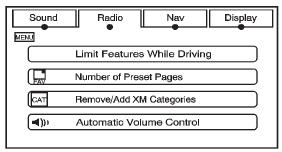
Press CONFIG to enter the configure menu screen, then press CONFIG repeatedly until Radio is selected or press the Radio screen button to make changes for radio information displayed or to limit features while driving, number of preset pages, XM (if equipped) categories, and Bose AudioPilot®.
Limit Features While Driving
Press the Limit Features While Driving screen button to turn on and off the ability to limit functions while driving. When this screen button is highlighted, the following functions are limited while driving:
- Music Navigator Scrolling
- Radio Category Scrolling
- Navigation Menu Scrolling and some functions
Number of Preset Pages
Press the Number of Preset Pages screen button to change the number of preset pages, 1 through 6. Each preset page can contain five preset stations. Press the desired numbered screen button.
Bose AudioPilot
AudioPilot: The Bose AudioPilot noise compensation technology. To use AudioPilot®:
1. Press CONFIG to enter the menu screen, then press CONFIG repeatedly until Radio is selected or press the Radio screen button
2. Press Automatic Volume Control to access the AudioPilot menu.
3. Press ON.
To turn it off, press OFF. When on, AudioPilot continuously adjusts the audio system equalization, to compensate for background noise, so that the music sound is consistent at the set volume level.
This feature is most effective at lower volume settings where background noise can affect how well the music being played is heard through the vehicle's audio system.
At higher volume settings, where the music is much louder than the background noise, there may be little or no adjustments by AudioPilot. For more information on AudioPilot, visit www.bose.com/ audiopilot.
Remove/Add XM Categories (US and Canada)
Press the Remove/Add XM Categories screen button to remove or add XM categories when selecting XM categories from the category list screen. The list of XM categories appear on the screen. Use the arrow screen buttons to scroll through the list. The categories to remove are highlighted and the categories to add are dark in color. Press the category to be added or removed. Press the Restore All Categories screen button to add all categories that have been removed.
 Sound Menu
(Sound): Press this key or press
CONFIG to access the Sound menu to adjust the treble, midrange, bass, fade, balance,
and Digital Signal Processing (DSP). The system automatically stores audio ad ...
 Radio Data System (RDS)
The audio system has a Radio Data System (RDS). RDS features are available for
use only on FM stations that broadcast RDS information. With RDS, the radio can
do the following:
Receive announcem ...
See also:
Questions and Answers About Safety Belts
Q: Will I be trapped in the vehicle after a crash if I am wearing a safety belt?
A: You could be— whether you are wearing a safety belt or not. Your chance of
being conscious during and after a cr ...
Exterior Mirrors
Premium Trim Shown, Up-Level Similar
Mirror Adjustment
1. Press (A) or (B) to select the driver or passenger side mirror.
2. Press the arrows on the control pad to move the mirror up, down, right ...
Seat belt locking mechanism
The rear outer seat belts and front passenger seat belts have a locking mechanism
which improves the retention of child seats. The procedure to install a child seat
is as follows:
1. Place the ch ...


