



 Cadillac Escalade: Power Windows
 WARNING
Leaving children in a vehicle with the keys is dangerous for many reasons. Children or others could be badly injured or even killed. They could operate the power windows or other controls or even make the vehicle move. The windows will function and they could be seriously injured or killed if caught in the path of a closing window. Do not leave keys in a vehicle with children.
When there are children in the rear seat use the window lockout button to prevent unintentional operation of the windows.
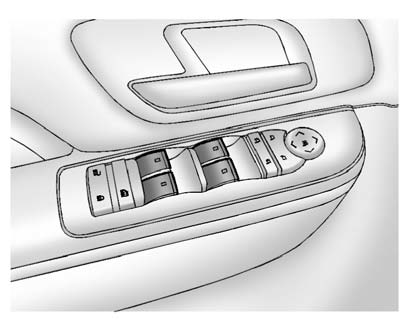
Premium Trim Shown, Up-Level Similar
The driver door has switches that control all windows, the passengers door switch only control that window. The power windows work when the ignition is in ON/RUN or ACC/ACCESSORY, or in Retained Accessory Power (RAP). See Retained Accessory Power (RAP) for more information. Press the switch to lower the window. Pull the switch up to raise it.
- Express-Down/Up Windows
- Express Window Anti-Pinch Feature
- Express Window Anti-Pinch Override
- Programming the Power Windows
- Window Lockout
 Windows
WARNING
Leaving children, helpless adults, or pets in a vehicle with the windows closed
is dangerous. They can be overcome by the extreme heat and suffer permanent injuries
or even death from h ...
 Express-Down/Up Windows
Windows with the express feature allow the windows to be raised and lowered all
the way without holding the switch.
Press or pull the switch fully and release it to activate the express feature.
Th ...
See also:
Child safety locks
If children are to be carried in the rear seat positions, it is recommended that
the rear door interior handles are disabled.
See 27, USING SEAT BELTS AND CHILD SAFETY LOCKS. ...
Replacing the vehicle battery
WARNING
Only install a battery of the same type and rating. Installing an incorrect battery
may result in a fire and injury, or damage to the electrical system. If you are
in any doubt when ...
Coolant
Important safety notes
The coolant is a mixture of water and
antifreeze/corrosion inhibitor. It performs
the following tasks:
• anti-corrosion protection
• antifreeze protection
• raising ...


