



 Buick Enclave: Power Seat Adjustment
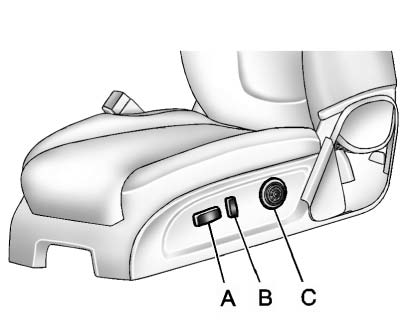
A. Seat Adjustment Control
B. Reclining Seatback Control
C. Lumbar Adjustment Control
► Raise or lower the front or rear part of the seat cushion by moving the front or rear of the control (A) up or down. ► Raise or lower the entire seat by moving the control (A) up or down.
To raise or recline the seatback, tilt the top of the control (B) forward or rearward. See Reclining Seatbacks .
Press the front or rear of the control (C) to increase or decrease lumbar support. See Lumbar Adjustment .
 Front Seats
...
 Lumbar Adjustment
Manual Lumbar
If available, move the handle forward or rearward to increase or decrease lumbar
support.
Power Lumbar
If available, press and hold the front or rear of control to incre ...
See also:
Brake fluid
For further brake fluid specification information,
see “Capacities and recommended
fuel/lubricants” in the “9. Technical and
consumer information” section of this
manual.
WARNING
& ...
Adaptive front lighting system (AFS)
When cornering using low beam, AFS will adjust the headlamp beams to provide
improved illumination in the direction of travel.
AFS is deactivated when:-
• Reverse gear is selected.
• The ...
Components and storage
The EASY-PACK load-securing kit allows you
to use your cargo compartment for a variety
of purposes. You can keep the EASY-PACK
load-securing kit in the bag supplied and store
it together with the ...


