



 Mercedes-Benz GL-Class: Overview of interior lighting
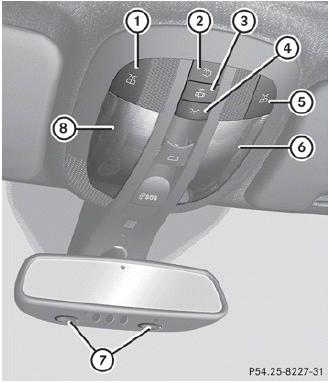
Overhead control panel
1  Switches the left-hand front
reading
lamp on/off
Switches the left-hand front
reading
lamp on/off
2  Switches the rear interior
lighting
on/off
Switches the rear interior
lighting
on/off
3  Switches the automatic interior
lighting control on/off
Switches the automatic interior
lighting control on/off
4  Switches the front interior
lighting
on/off
Switches the front interior
lighting
on/off
5 Switches the right-hand front
reading lamp on/off
6 Front interior lighting
7 Front reading lamps
8 Front interior lighting
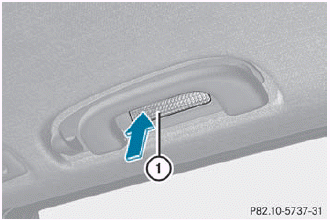
Rear overhead control panel (second row of seats) 1 Switches the reading lamp on/off
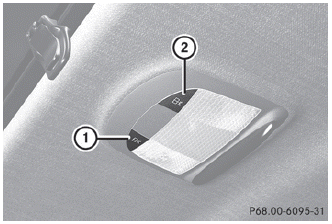
Rear overhead control panel (third row of seats)
1 Switches the left-hand reading
lamp
on/off
2 Switches the right-hand reading
lamp on/off

 Interior lighting control
Important notes
In order to prevent the vehicle's battery from
discharging, the interior lighting functions are
automatically deactivated after some time
except for when the SmartKey is in positio ...
See also:
Lights
Switching the daytime running lamps on/off
This function is not available in Canada.
If you have activated the Daytime Running
Lights function and the light switch is in the
position, the dayti ...
Hiding a service message
► Press the R reset button on the
instrument cluster. ...
Full screen view controls
The seek controls operate in the same manner as they do in preview mode.
Use the relevant soft key to select the 4:3, 16:9 or Zoom option. ...


