



 Mercedes-Benz GL-Class: Override feature for the rear sidewindows
WARNING 
When children ride on the vehicle's rear seats,
activate the override switch. Otherwise, the
children could be injured, e.g. by trapping
themselves in the rear side window.
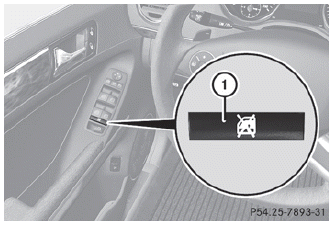
► To activate/deactivate: press switch 1.
Switch 1 is pushed in or extended. If the switch has engaged, operation of the rear side windows is deactivated. Operation is then only possible using the switches in the driver's door.
 Important safety notes
WARNING
When leaving the vehicle, always remove the
SmartKey from the ignition lock. Always take
the SmartKey with you and lock the vehicle.
Do not leave children unattended in the
ve ...
 Panic alarm
► To activate: press
button 1 for at
least one second.
An alarm sounds and the exterior lighting
flashes.
► To deactivate: press
button 1 again.
or
► Insert the SmartKe ...
See also:
Replacing the Engine Air Cleaner/ Filter
1. Locate the air cleaner/filter assembly. See Engine Compartment Overview
.
2. Loosen the four screws on the cover of the housing and lift up the cover.
3. Remove the engine air cleaner/ ...
Recommended Fuel
Use premium unleaded gasoline with a posted octane rating of 91 or higher. You
can also use regular unleaded gasoline rated at 87 octane or higher, but the vehicle's
acceleration could be slight ...
Cargo light
The cargo light switch has three positions:
ON 1 , center 2 and OFF 3 .
ON position
When the switch is in the ON position 1 ,
the cargo light will illuminate.
Center position
When the sw ...


