



 Mercedes-Benz GL-Class: Operating the sliding sunroof
Opening and closing
 You can continue to operate the sliding
sunroof after switching off the engine or
removing the SmartKey from the ignition
lock. This function is available for up to five
minutes or until the driver's or frontpassenger
door is opened.
You can continue to operate the sliding
sunroof after switching off the engine or
removing the SmartKey from the ignition
lock. This function is available for up to five
minutes or until the driver's or frontpassenger
door is opened.
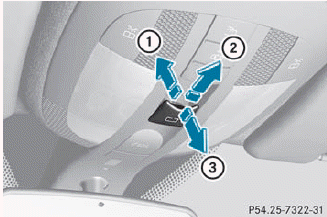
Overhead control panel
1 To raise
2 To open
3 To close/lower
► Turn the SmartKey to position 1 or 2 in
the
ignition lock.
► Press or pull the
 switch in the
corresponding direction.
switch in the
corresponding direction.
If you press the  switch beyond
the
point of resistance, an automatic opening/
closing process is started in the
corresponding direction. You can stop
automatic operation by operating the
switch again.
switch beyond
the
point of resistance, an automatic opening/
closing process is started in the
corresponding direction. You can stop
automatic operation by operating the
switch again.
When opening and raising the roof, automatic operation is only available if the sliding sunroof is in the closed position.
The sun protection cover automatically opens along with the sliding sunroof. You can open or close the sun protection cover manually when the sliding sunroof is raised or closed.
Resetting
Reset the sliding sunroof if it does not move smoothly, or if the battery has been disconnected or has become discharged.
► Remove the SmartKey from the ignition
lock or select position 0 (KEYLESS-GO).
► Remove the fuse for the sliding sunroof
from the fuse box. To find out where the
fuse is located, refer to the fuse allocation
chart in the vehicle tool kit.
► Reinsert the fuse.
► Turn the SmartKey to position 2 in the
ignition lock.
► Raise the sliding sunroof fully at the
rear.
► Keep the
switch pressed for another
second.
► Make sure that the sliding sunroof can be
fully opened and closed again.
► If this is not the case, repeat the steps
above again.
 If the sliding sunroof still cannot be
opened or closed fully after resetting,
contact a qualified specialist workshop.
If the sliding sunroof still cannot be
opened or closed fully after resetting,
contact a qualified specialist workshop.
 Sliding sunroof
Important safety notes
WARNING
When opening or closing the sliding sunroof,
make sure that there is no danger of anyone
being harmed by the opening/closing
procedure.
The sliding sun ...
 Problems with the sliding sunroof
Problem: the sunroof cannot be closed
and you cannot see the cause.
WARNING
You could be severely or even fatally injured
when closing the sliding sunroof with
increased closing force ...
See also:
Push-button ignition switch positions
LOCK (Normal parking position)
The ignition switch can only be locked in
this position.
The ignition switch will be unlocked when
it is pushed to the ACC position while
carrying the Intellige ...
Treadwear 200 Traction AA Temperature A
The following information relates to the system developed by the United States
National Highway Traffic Safety Administration (NHTSA), which grades tires by treadwear,
traction, and temperature perf ...
How to use touch screen
CAUTION
► The glass screen on the liquid crystal
display may break if it is hit with a hard
or sharp object. If the glass screen
breaks, do not touch it. Doing so could
result in an ...


