



 Infiniti QX: INFINITI Voice Recognition Standard Mode
The following section is applicable when the Standard Mode is activated. The Standard Mode enables you to complete the desired operation by simply following the prompts that appear on the display and also are announced by the system.
Activating Standard Mode
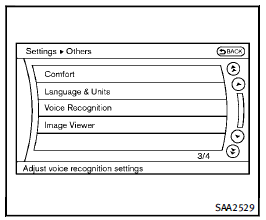
When the Alternate Command Mode is active, perform the following steps to switch to the Standard Mode. 1. Push the SETTING button on the instrument panel. 2. Select the “Others” key. 3. Select the “Voice Recognition” key.
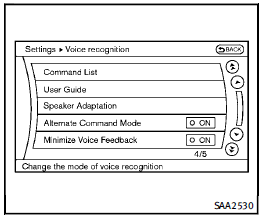
4. Select the “Alternate Command Mode”
key.
5. The indicator turns off and the Standard
Mode activates.
Displaying user guide
If you use the INFINITI Voice Recognition system for the first time or you do not know how to operate it, you can display the User Guide for confirmation. You can confirm how to use voice commands by accessing a simplified User Guide, which contains basic instructions and tutorials for several voice commands.
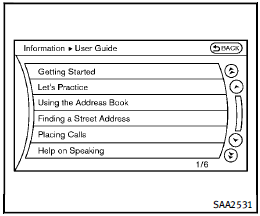
1. Push the INFO button on the instrument
panel.
2. Select the “Others” key.
3. Select the “Voice Recognition” key.
4. Select the “User Guide” key.
5. Select a preferred item.
You can skip steps 1 and 3 above if you say “Help”.
Available items:
► Getting Started
Describes the basics of how to operate the INFINITI Voice Recognition system.
► Let’s Practice
Mode that allows practicing by following the instructions of the system voice.
► Using the Address Book
Tutorial for entering a destination by using the Address Book.
► Finding a Street Address (if soequipped)
Tutorial for entering a destination by street address.
► Placing Calls
Tutorial for making a phone call by voice command operation.
► Help on Speaking
Displays useful tips of speaking for correct command recognition by the system. Note that the Command List feature is only available when Alternate Command Mode is active.
Getting Started
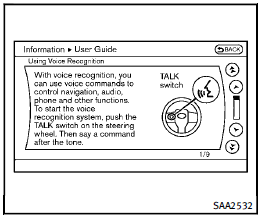
Before using the INFINITI Voice Recognition system for the first time, you can confirm how to use commands by viewing the Getting Started section of the User Guide. 1. Select the “Getting Started” key. 2. You can confirm the page by scrolling the screen using the INFINITI controller.
Tutorials on the operation of the INFINITI Voice Recognition system
If you choose “Using the Address Book”, “Finding a Street Address” or “Placing Calls”, you can view tutorials on how to perform these operations using INFINITI Voice Recognition.
Let’s Practice
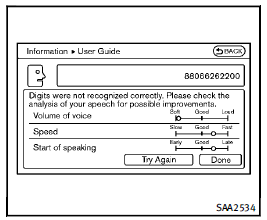
This mode helps learn how to use the INFINITI Voice Recognition system. 1. Select the “Let’s Practice” key. 2. After the message screen appears, push the TALK switch on the steering wheel. 3. Speak the displayed number after the tone. The evaluation screen will be displayed and the result can be confirmed.
Useful tips for correct operation
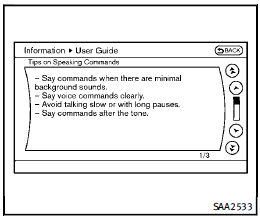
You can display useful speaking tips to help the system recognize your voice commands correctly. Select “Help on Speaking” to start display.
 INFINITI Voice Recognition system
INFINITI Voice Recognition allows handsfree
operation of the Phone, Navigation,
Information and Audio systems in one of
two modes, Standard Mode or Alternate
Command Mode.
In Standard Mode, ...
 Using the system
Initialization
When the ignition switch is pushed to the
ON position, INFINITI Voice Recognition is
initialized, which may take up to one
minute. When completed, the system is
ready to accept ...
See also:
Tire pressure of at least 180 kPa(1.8 bar/26 psi) is not reached
If, after five minutes, a pressure of 180 kPa
(1.8 bar/26 psi) has not been achieved:
► Press the on/off switch on the tire
inflation
compressor to 0.
The tire inflation compressor is ...
Using RSE
The system is operated using the remote control.
To release the remote from the docked position, press at the top of the remote
to unlatch it.
NOTICE
Do not attempt to pull the remote contro ...
Navigation System
If the vehicle has a navigation system, use of the system may result in the storage
of destinations, addresses, telephone numbers, and other trip information. Refer
to the navigation manual for in ...


