



 Mercedes-Benz GL-Class: Indicator and warning display
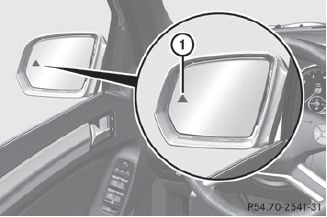
1 Yellow indicator lamp/red warning lamp
When Blind Spot Assist is activated, indicator lamp 1 lights up yellow in the exterior mirrors up to a vehicle speed of 20 mph (30 km/h). When the vehicle speed exceeds 20 mph (30 km/h), the indicator lamp goes out and Blind Spot Assist is ready for use.
When your speed exceeds approximately 20 mph (30 km/h), warning lamp 1 lights up red on the corresponding side whenever a vehicle is detected in the blind spot monitoring range. This warning is always given when a vehicle enters the blind spot monitoring range from behind or from the side. When you are passing another vehicle, the warning is emitted only if the difference in speed is less than 7 mph (12 km/h).
The yellow indicator lamp goes out if the reverse gear is engaged. In this event, Blind Spot Assist is no longer active.
The brightness of the indicator/warning lamps is adjusted automatically according to the ambient light.
WARNING 
Blind Spot Assist is not active at speeds under
approximately 20 mph (30 km/h). The
indicator lamps in the exterior mirrors are
yellow. Vehicles in the monitoring range are
then not indicated.
Always pay attention to traffic conditions and
your surroundings. Otherwise, you may fail to
recognize dangers in time, cause an accident
and injure yourself and others.
 Monitoring range of the sensors
Blind Spot Assist monitors the area shown in
the figure up to 10 ft (3 m) behind and
immediately adjacent to your vehicle.
WARNING
Blind Spot Assist monitors certain areas in the
im ...
 Collision warning
If a vehicle is detected in the monitoring range
of Blind Spot Assist and you switch on the turn
signal, a double warning tone sounds. Red
warning lamp 1 flashes. If the turn signal
remains on, de ...
See also:
Automatic transmission
1. To select Drive (D) when the vehicle is stationary, apply the foot brake and
press the gear selector release button.
Note: If pressure is applied to the selector lever before the foot brake is ...
Radio Reception
Frequency interference and static can occur during normal radio reception if
items such as cell phone chargers, vehicle convenience accessories, and external
electronic devices are plugged into th ...
Empty Folder
Folders that do not contain files are skipped, and the player advances to the
next folder that contains files. ...


