



 Cadillac Escalade: Heated and Ventilated Seats
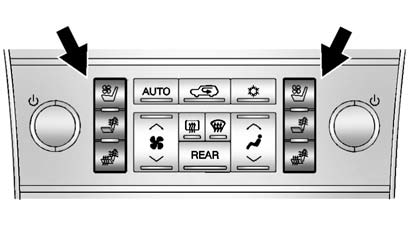
The buttons are on the climate control panel.
 : Press to cool the entire seat.
 : Press to heat the seatback only.
 : Press to heat the seat and seatback.
Press the desired button once for the highest setting. With each press of the button, the seat will change to the next lower setting, and then to the off setting. Indicator bars next to the symbol on the climate control display show the selected setting: three for high, two for medium, and one for low.
See Heated and Ventilated Front Seats .
 Third Row Seats
On vehicles with third row seats, the seatbacks can be folded, and the entire
seat can be tumbled or removed from the vehicle.
For detailed instructions, see Third Row Seats . ...
 Heated Rear Seats
The buttons are on the Rear Sear Audio (RSA) panel on the rear of the center
console.
Press or
to heat the left outboard or right
outboard seat cushion and to cycle through the temperature set ...
See also:
Cleaning fabric upholstery
WARNING
Do not polish the instrument panel. Polished surfaces are reflective, and may
interfere with the drivers view.
Clean plastic or cloth faced surfaces with warm water and non-detergent ...
Folding and Tumbling the Seat from the Third Row Seat
WARNING
Using the third row seating position while the second row is folded, or folded
and tumbled, could cause injury in a sudden stop or crash. Be sure to return the
seat to the passenger sea ...
Ashtray in the rear-compartment centerconsole
Close the ashtray when it is not in use and
before you fold the rear seats forward. You
can otherwise damage the ashtray.
► To open: briefly press marking 2.
Ashtray 2 opens.
► ...


