



 Range Rover: Emergency key
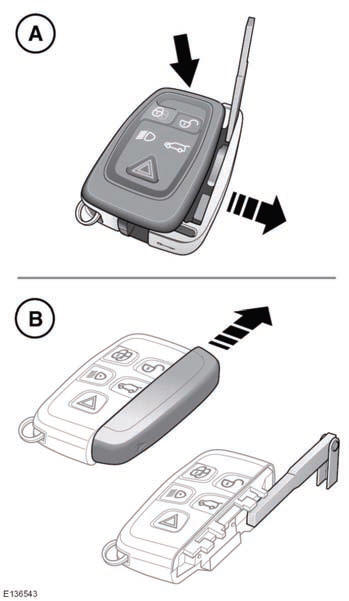
Note: There are two designs of Smart Key, refer to the information which is relevant to the design of Smart Key supplied with the vehicle.
A. Press emergency key release button and pull out side cover to release the key.
B. Slide and remove cover to expose the emergency key.
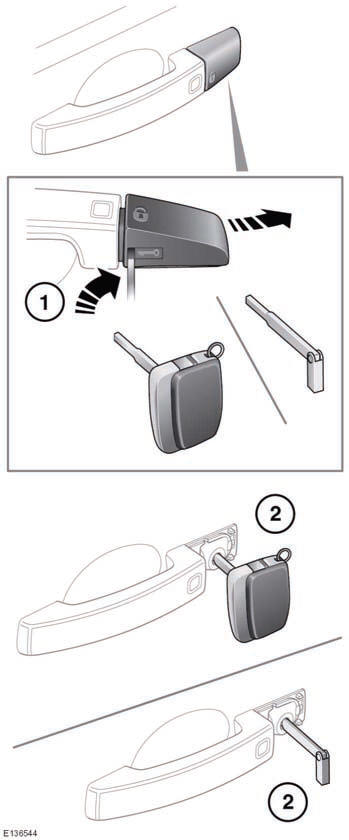
1. Insert the key blade into the slot at the base of the door lock cover and gently lever the key blade upwards.
Carefully twist the key blade, to lever the cover off the retaining clips.
2. Insert the key blade into the exposed lock to operate.
If the vehicle is unlocked using the emergency key blade with the security system armed, the alarm will sound when the door is unlocked. The alarm will continue to sound until the remote key fob is positioned correctly. See 74, IF THE ENGINE FAILS TO START.
 Unlocking the vehicle
WARNING
To prevent accidental or unauthorized operation, never leave the Smart Key unattended
in the vehicle. Never leave children or animals unattended in the vehicle. The vehicle
can be ...
 Global opening
Press and hold the unlock button for 3 seconds to unlock the vehicle and open
all of the windows.
To cancel global opening, press any of the buttons on the smart key or operate
the driver’s win ...
See also:
Rear media control from the touch screen
When the main rear media control screen is displayed on the touch screen, the
rear media remote control will be locked out. No part of the rear media system will
operate until it is turned on via ...
Warning Lights, Gauges, and Indicators
WARNING lights and gauges can signal that something is wrong before it becomes
serious enough to cause an expensive repair or replacement. Paying attention to
the warning lights and gauges could ...
On-pavement and off-road driving precautions
Utility vehicles have a significantly higher
rollover rate than other types of vehicles.
They have higher ground clearance than
passenger cars to make them capable of
performing in a variety of ...


